Step 7 — Staff Configuration
Step 7 of 11 — Staff Configuration is where you register the staff members who work at the villa. Each staff member gets a full profile including personal details, contact info, emergency contacts, employment terms, salary, and benefits.
Adding Staff Members
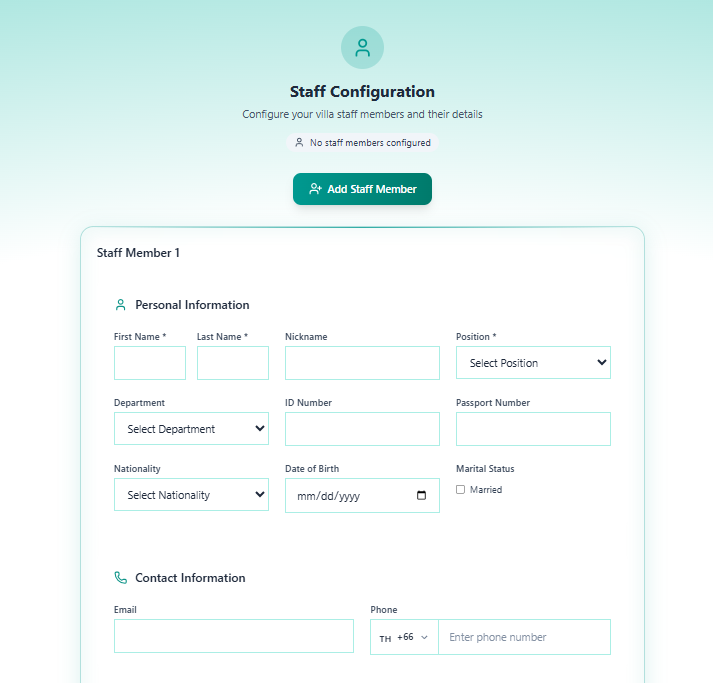
Section titled “Adding Staff Members”The step starts empty — “No staff members configured”.
Click + Add Staff Member to create the first staff record. You can add as many staff members as needed, each in their own numbered card (Staff Member 1, Staff Member 2, etc.).
Staff Member Fields
Section titled “Staff Member Fields”Each staff member card has 5 sub-sections:
Personal Information
Section titled “Personal Information”| Field | Required | Description |
|---|---|---|
| First Name | Yes | Staff member’s first name |
| Last Name | Yes | Staff member’s last name |
| Nickname | No | Preferred name |
| Position | Yes | Job role — select from dropdown (e.g. Housekeeper, Manager, Chef) |
| Department | No | Department — select from dropdown |
| ID Number | No | National ID card number |
| Passport Number | No | Passport number |
| Nationality | No | Nationality — select from dropdown |
| Date of Birth | No | Date of birth |
| Marital Status | No | Checkbox: Married |
Contact Information
Section titled “Contact Information”| Field | Description |
|---|---|
| Staff member’s email address | |
| Phone | Phone number with country code (default TH +66) |
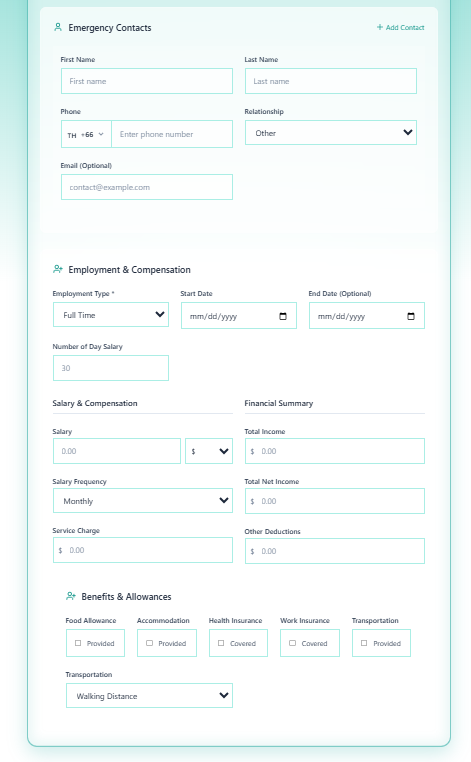
Emergency Contacts
Section titled “Emergency Contacts”Click + Add Contact to add one or more emergency contacts per staff member.
| Field | Description |
|---|---|
| First Name | Contact’s first name |
| Last Name | Contact’s last name |
| Phone | Contact’s phone with country code |
| Relationship | Relationship to staff (e.g. Spouse, Parent, Other) |
| Contact’s email (optional) |
Employment & Compensation
Section titled “Employment & Compensation”| Field | Required | Description | Default |
|---|---|---|---|
| Employment Type | Yes | Contract type | Full Time |
| Start Date | No | Employment start date | — |
| End Date | No | Contract end date (if fixed-term) | — |
| Number of Day Salary | No | Days per month for salary calculation | 30 |
Salary & Compensation:
| Field | Description |
|---|---|
| Salary | Base salary amount in USD ($) |
| Salary Frequency | Pay cycle — default Monthly |
| Service Charge | Service charge component |
Financial Summary (auto-calculated):
| Field | Description |
|---|---|
| Total Income | Combined salary + service charge |
| Total Net Income | After deductions |
| Other Deductions | Any additional deductions |
Benefits & Allowances
Section titled “Benefits & Allowances”| Benefit | Field Type |
|---|---|
| Food Allowance | Checkbox: Provided |
| Accommodation | Checkbox: Provided |
| Health Insurance | Checkbox: Covered |
| Work Insurance | Checkbox: Covered |
| Transportation | Checkbox: Provided |
| Transportation Type | Dropdown — default Walking Distance |
Navigation
Section titled “Navigation”| Control | Action |
|---|---|
| Previous | Return to Step 6 — Documents Upload |
| Save Progress | Save without advancing |
| Next | Save and advance to Step 8 — Facilities Checklist |
This step is optional — you can skip and add staff later from the villa profile.
Proceed to Step 8 — Facilities Checklist.