Categories
The Categories section in the M3 sidebar contains three specialised tracking modules: Linens & Towels, Consumables, and Templates. Each is a dedicated sub-module with its own KPIs, item list, and management tools.
Linens & Towels
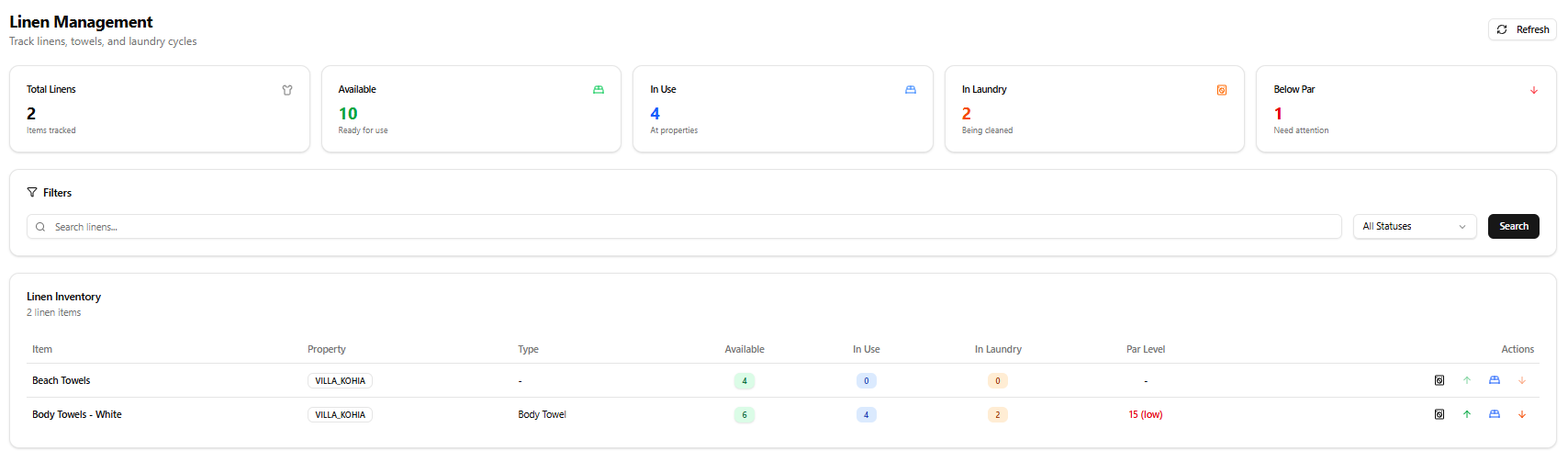
Section titled “Linens & Towels”Title: Linen Management Subtitle: Track linens, towels, and laundry cycles
The Linen Management module tracks linen items specifically, with lifecycle states that reflect real housekeeping operations: available, in use, and in laundry.
Page Header
Section titled “Page Header”| Element | Description |
|---|---|
| Refresh | Reload linen data |
KPI Cards
Section titled “KPI Cards”| Card | Colour | Description |
|---|---|---|
| Total Linens | Gray | Total linen item types tracked |
| Available | Green | Units ready for use |
| In Use | Blue | Units currently at properties |
| In Laundry | Orange | Units currently being cleaned |
| Below Par | Red | Item types below their par level threshold |
Example values (live data): Total: 2 · Available: 10 · In Use: 4 · In Laundry: 2 · Below Par: 1
Filters
Section titled “Filters”| Control | Description |
|---|---|
| Search linens… | Search by item name |
| All Statuses | Filter by status |
| Search | Apply filters |
Linen Inventory Table
Section titled “Linen Inventory Table”| Column | Description |
|---|---|
| Item | Linen item name |
| Property | Property code (e.g. VILLA_KOHIA) |
| Type | Linen sub-type (e.g. Body Towel), or – if not set |
| Available | Units ready for use (green badge) |
| In Use | Units at properties (blue badge) |
| In Laundry | Units being washed (orange badge) |
| Par Level | Target quantity per reservation — shown in red with (low) when below par |
| Actions | View · Move to Available (↑) · Move to Laundry · Move to In Use (↓) |
Current Linen Items (Live Data)
Section titled “Current Linen Items (Live Data)”| Item | Property | Type | Available | In Use | In Laundry | Par Level |
|---|---|---|---|---|---|---|
| Beach Towels | VILLA_KOHIA | — | 4 | 0 | 0 | — |
| Body Towels - White | VILLA_KOHIA | Body Towel | 6 | 4 | 2 | 15 (low) |
Consumables
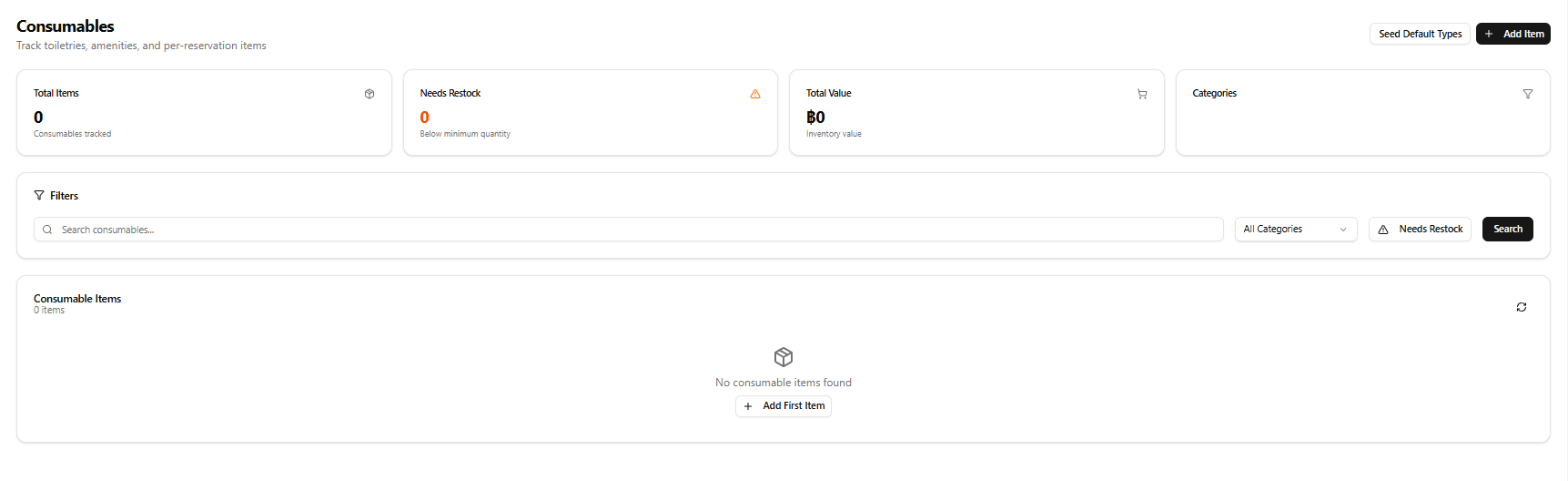
Section titled “Consumables”Title: Consumables Subtitle: Track toiletries, amenities, and per-reservation items
The Consumables module tracks single-use or per-reservation items such as toiletries, cleaning supplies, and guest amenities.
Page Header
Section titled “Page Header”| Element | Description |
|---|---|
| Seed Default Types | Populates the system with a standard set of consumable types |
| + Add Item | Opens the Add Consumable form |
KPI Cards
Section titled “KPI Cards”| Card | Colour | Description |
|---|---|---|
| Total Items | Gray | Consumables tracked |
| Needs Restock | Orange | Items below minimum quantity |
| Total Value | Green (฿) | Total inventory value |
| Categories | Gray | Number of consumable categories in use |
Filters
Section titled “Filters”| Control | Description |
|---|---|
| Search consumables… | Text search |
| All Categories | Filter by category |
| Needs Restock | Toggle to show only items needing restock |
| Search | Apply filters |
Consumable Items Panel
Section titled “Consumable Items Panel”Lists all consumable items with restock status. When empty:
No consumable items found + Add First Item button
Templates
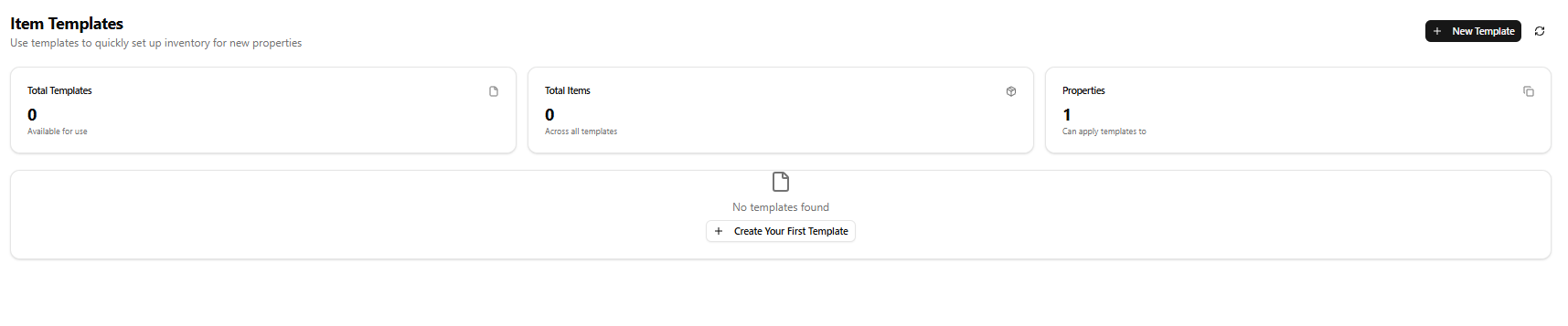
Section titled “Templates”Title: Item Templates Subtitle: Use templates to quickly set up inventory for new properties
The Templates module lets you define a standard set of items for a property type (e.g. a 3-bedroom villa) and apply it in bulk when onboarding a new property.
Page Header
Section titled “Page Header”| Element | Description |
|---|---|
| + New Template | Opens the New Template modal |
| Refresh | Reload template data |
KPI Cards
Section titled “KPI Cards”| Card | Description |
|---|---|
| Total Templates | Templates available for use |
| Total Items | Items across all templates |
| Properties | Number of properties templates can be applied to |
Example values (live data): Total Templates: 0 · Total Items: 0 · Properties: 1
When no templates exist:
No templates found + Create Your First Template button
New Template Modal
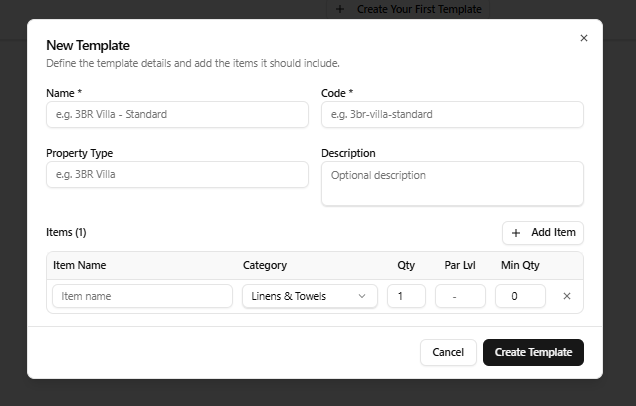
Section titled “New Template Modal”Opened via + New Template or + Create Your First Template.
Title: New Template Subtitle: Define the template details and add the items it should include.
| Field | Required | Notes |
|---|---|---|
| Name | Yes | e.g. 3BR Villa - Standard |
| Code | Yes | e.g. 3br-villa-standard |
| Property Type | No | e.g. 3BR Villa |
| Description | No | Optional description |
Items table — add one or more items to the template:
| Column | Notes |
|---|---|
| Item Name | Free text item name |
| Category | Dropdown — e.g. Linens & Towels |
| Qty | Default quantity, default 1 |
| Par Lvl | Par level, default – |
| Min Qty | Minimum quantity, default 0 |
| × | Remove item row |
Use + Add Item to add more rows.
| Button | Action |
|---|---|
| Cancel | Close modal without saving |
| Create Template | Save the template |