Step 1 — Villa Information
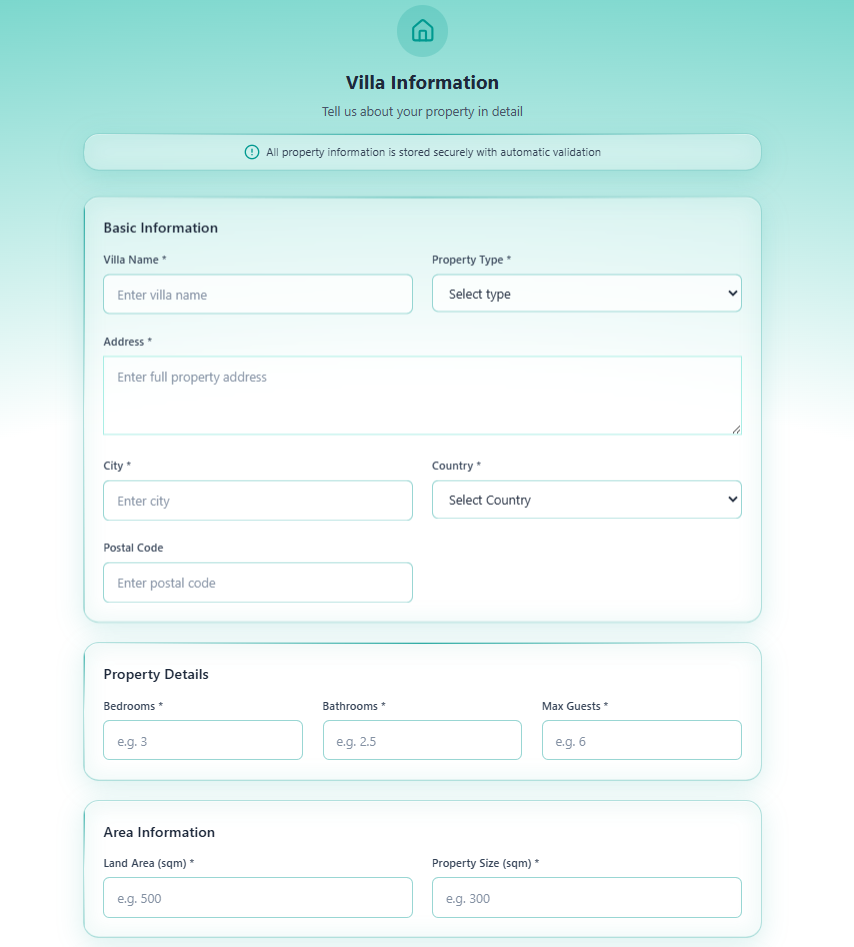
Step 1 of 11 — Villa Information is the first step of the onboarding wizard. It collects all core property data — identity, location, size, description, and external links.
“All property information is stored securely with automatic validation”
The 11-Step Wizard
Section titled “The 11-Step Wizard”graph LR S1([1\nVilla Info]) --> S2([2\nOwner Details]) S2 --> S3([3\nContractual Details]) S3 --> S4([4\nBank Details]) S4 --> S5([5\nAccount Credentials]) S5 --> S6([6\nDocuments Upload]) S6 --> S7([7\nStaff Config]) S7 --> S8([8\nFacilities Checklist]) S8 --> S9([9\nPhoto Upload]) S9 --> S10([10\nLocation & Attractions]) S10 --> S11([11\nReview & Submit])
style S1 fill:#0d9488,color:#fffSections in This Step
Section titled “Sections in This Step”Step 1 is divided into 8 sections, all on one scrollable page.
Section 1 — Basic Information
Section titled “Section 1 — Basic Information”The primary identification details for the property.
| Field | Required | Description | Example |
|---|---|---|---|
| Villa Name | Yes | The official name of the property | Sea Theatre Kata: Villa Mare' |
| Property Type | Yes | Type of property — select from dropdown | Villa, Apartment |
| Address | Yes | Full street address (textarea) | 123 Kata Beach Road |
| City | Yes | City where the property is located | Phuket |
| Country | Yes | Country — select from dropdown | Thailand |
| Postal Code | No | Postal / ZIP code | 83100 |
Section 2 — Property Details
Section titled “Section 2 — Property Details”Physical dimensions and capacity of the property.
| Field | Required | Description | Example |
|---|---|---|---|
| Bedrooms | Yes | Number of bedrooms | 3 |
| Bathrooms | Yes | Number of bathrooms (decimals allowed) | 2.5 |
| Max Guests | Yes | Maximum guest capacity | 6 |
Section 3 — Area Information
Section titled “Section 3 — Area Information”Size of the property and land.
| Field | Required | Description | Example |
|---|---|---|---|
| Land Area (sqm) | Yes | Total land area in square metres | 500 |
| Property Size (sqm) | Yes | Built-up / interior floor area | 300 |
Section 4 — Villa Details
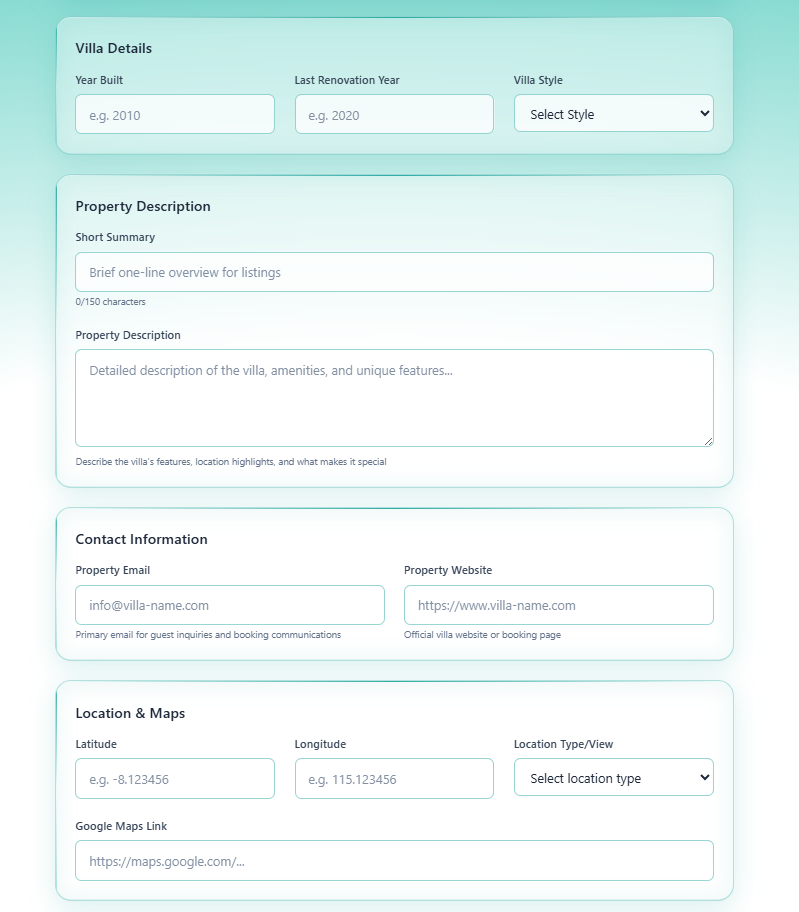
Section titled “Section 4 — Villa Details”Historical and style information.
| Field | Required | Description | Example |
|---|---|---|---|
| Year Built | No | Year of original construction | 2010 |
| Last Renovation Year | No | Most recent renovation | 2020 |
| Villa Style | No | Architectural/design style — select from dropdown | Tropical, Modern, Traditional |
Section 5 — Property Description
Section titled “Section 5 — Property Description”Marketing copy that will appear in listings.
| Field | Required | Limit | Description |
|---|---|---|---|
| Short Summary | No | 150 characters | Brief one-line overview for listing pages |
| Property Description | No | No limit | Full description covering features, location highlights, and unique selling points |
Tip: Write the Short Summary as a single compelling sentence. The Property Description should cover all key amenities, views, and what makes the villa special.
Section 6 — Contact Information
Section titled “Section 6 — Contact Information”Direct contact details for the property.
| Field | Required | Description | Example |
|---|---|---|---|
| Property Email | No | Primary email for guest inquiries | [email protected] |
| Property Website | No | Official villa website or booking page | https://www.villa-name.com |
Section 7 — Location & Maps
Section titled “Section 7 — Location & Maps”Precise geographical coordinates and map link.
| Field | Required | Description | Example |
|---|---|---|---|
| Latitude | No | GPS latitude coordinate | -8.123456 |
| Longitude | No | GPS longitude coordinate | 115.123456 |
| Location Type/View | No | Type of view or setting — dropdown | Beach, Mountain, Garden |
| Google Maps Link | No | Direct URL to the property on Google Maps | https://maps.google.com/... |
Tip: To find coordinates, open Google Maps, right-click on the property location, and copy the coordinates shown.
Section 8 — External Links
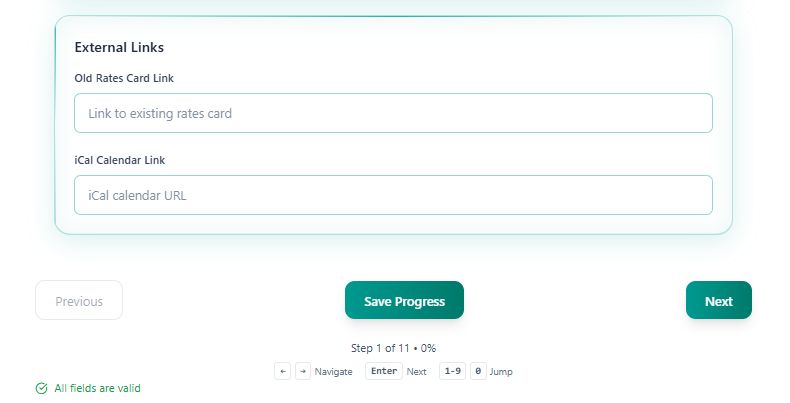
Section titled “Section 8 — External Links”Links to external resources and calendar sync.
| Field | Required | Description |
|---|---|---|
| Old Rates Card Link | No | URL to an existing rates/pricing card document |
| iCal Calendar Link | No | iCal URL for calendar synchronisation with booking platforms |
Navigation
Section titled “Navigation”| Control | Action |
|---|---|
| Save Progress | Saves all entered data without advancing. Use frequently. |
| Next | Saves and advances to Step 2 — Owner Details |
| Previous | Disabled on Step 1 |
Keyboard shortcuts:
←→— Navigate between fieldsEnter— Move to next field1–9— Jump to step number0— Jump to last step
The status line at the bottom shows: Step 1 of 11 • 0% — the percentage updates as fields are completed.
Validation
Section titled “Validation”Fields marked with * are required. The wizard shows ”✓ All fields are valid” in green when all required fields on the current step pass validation. You cannot advance to Step 2 until required fields are filled.
After Saving Step 1
Section titled “After Saving Step 1”- The villa name in My Villas updates from
New Villato the name you entered - Location appears below the villa name in the list
- Progress updates from
0%
Proceed to Step 2 — Owner Details.