Staff Management
The Staff Management module maintains the full personnel directory for M2 — roles, specializations, contact details, availability, and team memberships. It also includes the Team Management sub-section for organising staff into work teams.
Page Header
Section titled “Page Header”| Element | Description |
|---|---|
| Title | Staff Management |
| Subtitle | Manage technicians, teams, and assignments |
| Manage Teams | Opens the Team Management page |
| + Add Staff | Opens the Add Staff Member form |
KPI Cards
Section titled “KPI Cards”| Card | Colour | Description |
|---|---|---|
| Total Staff | Blue | All registered staff profiles |
| Technicians | Blue | Staff with the Technician role |
| Available | Green | Staff currently available for assignment |
| On Assignment | Blue | Staff actively assigned to work orders |
Example values (live data): Total: 10 · Technicians: 7 · Available: 10 · On Assignment: 0
Search & Filter
Section titled “Search & Filter”| Control | Description |
|---|---|
| Search by name, email, employee ID… | Full-text search |
| All Roles | Filter by role (Admin / Manager / Technician) |
| All Status | Filter by availability status |
Staff Directory
Section titled “Staff Directory”The Staff Directory table lists all 10 staff members.
Table Columns
Section titled “Table Columns”| Column | Description |
|---|---|
| Staff Member | Avatar initials, name, email, phone (if set) |
| Role | Colour-coded role badge |
| Specializations | Service category tags (if assigned) |
| Availability | Available (green) or On Assignment |
| Teams | Team membership (or – if none) |
| Work Orders | Count of assigned work orders |
| Actions | ⋯ menu for profile actions |
Role Badge Colours
Section titled “Role Badge Colours”| Role | Colour |
|---|---|
| Admin | Purple |
| Manager | Green |
| Technician | Teal/Blue |
Current Staff (Live Data)
Section titled “Current Staff (Live Data)”| Name | Phone | Role | Specializations | |
|---|---|---|---|---|
| Admin User | [email protected] | — | Admin | — |
| Ahmed Hassan | [email protected] | +971503456789 | Technician | Plumbing, HVAC |
| Andrei Fiat | [email protected] | — | Technician | — |
| Kulwadee Suttajit (Jenny) | [email protected] | — | Technician | — |
| Omar Khalil | [email protected] | +971504567890 | Technician | Electrical, Structural |
| Ploytawan Petseemuang (Ploy) | [email protected] | — | Technician | — |
| Sarah Al-Rashid | [email protected] | +971502345678 | Manager | — |
| Sathaporn Chusawang (Boy) | [email protected] | — | Technician | — |
| Sivakorn Tanyupak (Book) | [email protected] | — | Technician | — |
| Test Admin | [email protected] | +971501234567 | Admin | — |
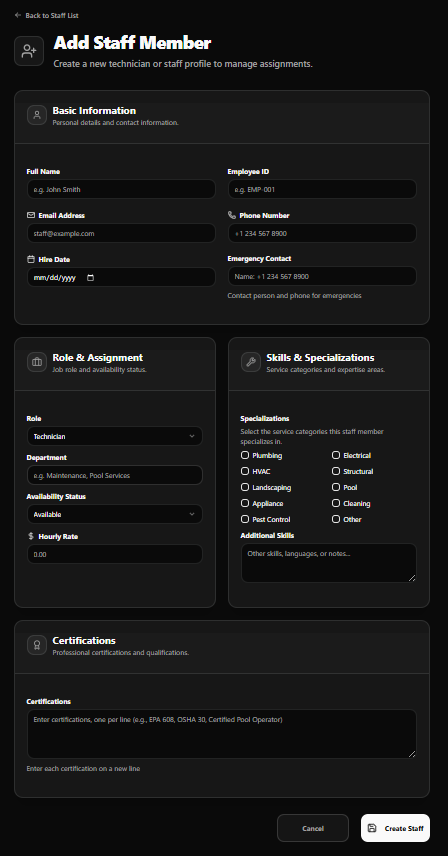
Add Staff Member Form
Section titled “Add Staff Member Form”Access via + Add Staff. Back link: ← Back to Staff List
Title: Add Staff Member Subtitle: Create a new technician or staff profile to manage assignments.
Basic Information
Section titled “Basic Information”Personal details and contact information
| Field | Notes |
|---|---|
| Full Name | e.g. John Smith |
| Employee ID | e.g. EMP 001 |
| Email Address | e.g. [email protected] |
| Phone Number | e.g. +1 234 567 8900 |
| Hire Date | Date picker |
| Emergency Contact | Contact person name and phone number for emergencies |
Role & Assignment
Section titled “Role & Assignment”Job role and availability status
| Field | Notes |
|---|---|
| Role | Default: Technician |
| Department | e.g. Maintenance, Pool Services |
| Availability Status | Default: Available |
| Hourly Rate | Numeric, default 0.00 |
Skills & Specializations
Section titled “Skills & Specializations”Service categories and expertise areas
Specializations (checkboxes — select all that apply):
| Column 1 | Column 2 |
|---|---|
| Plumbing | Electrical |
| HVAC | Structural |
| Landscaping | Pool |
| Appliance | Cleaning |
| Pest Control | Other |
Additional Skills — free-text field for other skills, languages, or notes.
Certifications
Section titled “Certifications”Professional certifications and qualifications
Free-text area — enter one certification per line.
e.g.
EPA 608,OSHA 30,Certified Pool Operator
Form Actions
Section titled “Form Actions”| Button | Action |
|---|---|
| Cancel | Discard and return to Staff Directory |
| Create Staff | Save and create the staff profile |
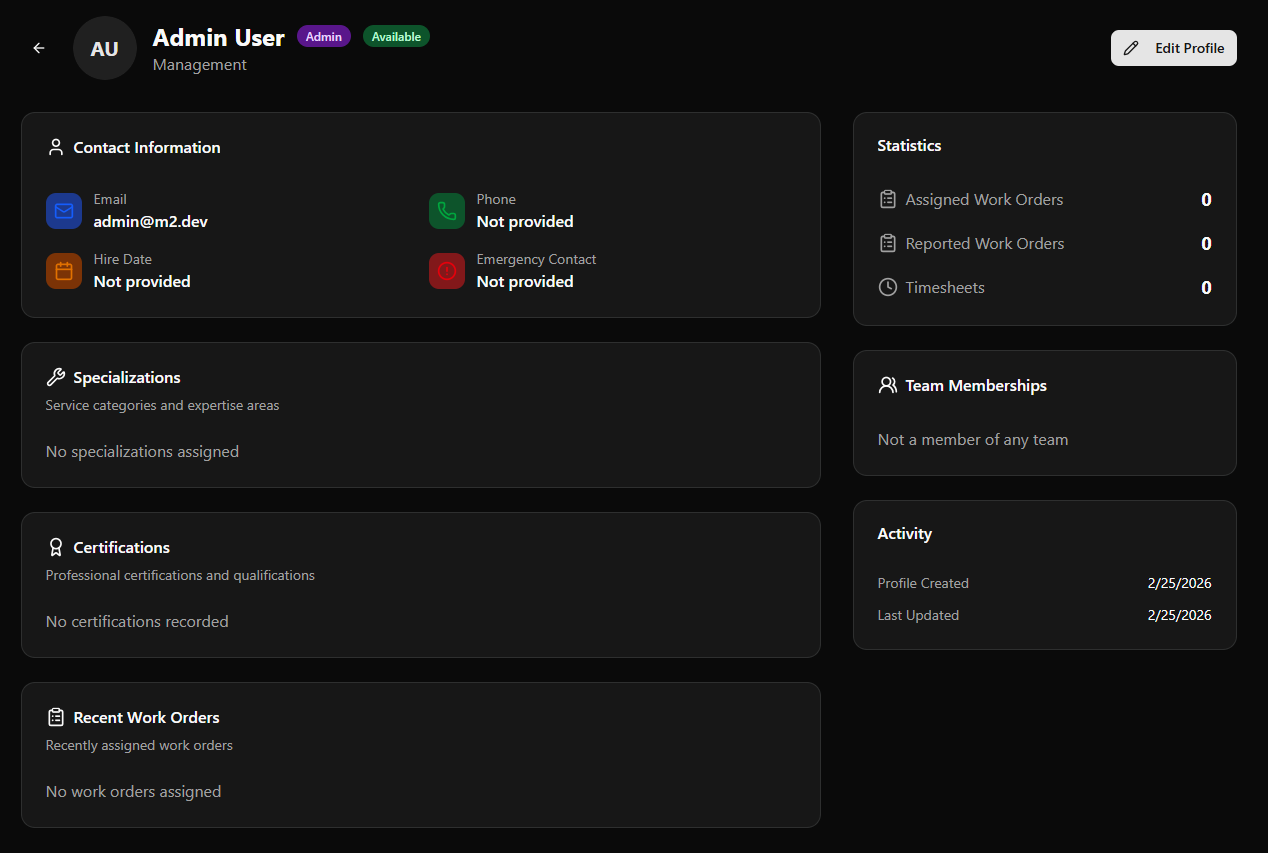
Staff Profile Page
Section titled “Staff Profile Page”Click any staff row to open their full profile.
Page Header
Section titled “Page Header”| Element | Description |
|---|---|
| Avatar | Initials or photo |
| Name | Full name |
| Role badge | e.g. Admin (purple) |
| Availability badge | e.g. Available (green) |
| Department | e.g. Management |
| Edit Profile | Opens the profile in edit mode |
| Back arrow | Returns to Staff Directory |
Contact Information
Section titled “Contact Information”| Field | Example |
|---|---|
| [email protected] | |
| Phone | Not provided |
| Hire Date | Not provided |
| Emergency Contact | Not provided |
Specializations
Section titled “Specializations”Lists all service categories assigned to this staff member. Displays No specializations assigned if none set.
Certifications
Section titled “Certifications”Lists professional certifications entered for this staff member. Displays No certifications recorded if none set.
Recent Work Orders
Section titled “Recent Work Orders”Shows the most recently assigned work orders. Displays No work orders assigned if none.
Statistics (Sidebar)
Section titled “Statistics (Sidebar)”| Metric | Description |
|---|---|
| Assigned Work Orders | Total WOs assigned to this staff member |
| Reported Work Orders | Total WOs reported by this staff member |
| Timesheets | Total timesheet entries submitted |
Team Memberships (Sidebar)
Section titled “Team Memberships (Sidebar)”Lists all teams this staff member belongs to. Displays Not a member of any team if unassigned.
Activity (Sidebar)
Section titled “Activity (Sidebar)”| Field | Example |
|---|---|
| Profile Created | 2/25/2026 |
| Last Updated | 2/25/2026 |
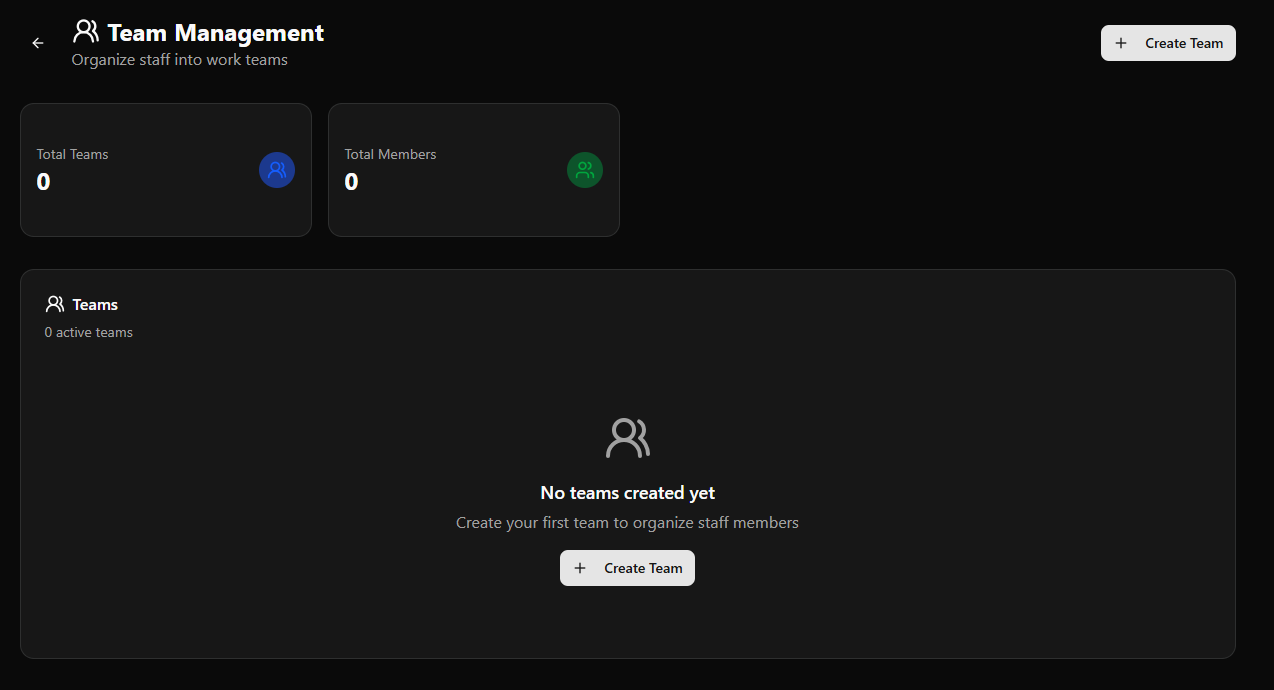
Team Management
Section titled “Team Management”Access via the Manage Teams button on the Staff Management page.
Page Header
Section titled “Page Header”| Element | Description |
|---|---|
| Title | Team Management |
| Subtitle | Organize staff into work teams |
| + Create Team | Opens the Create Team form |
| Back arrow | Returns to Staff Management |
KPI Cards
Section titled “KPI Cards”| Card | Description |
|---|---|
| Total Teams | All registered teams |
| Total Members | Total staff across all teams |
When no teams exist, the Teams panel shows:
No teams created yet — Create your first team to organize staff members + Create Team button
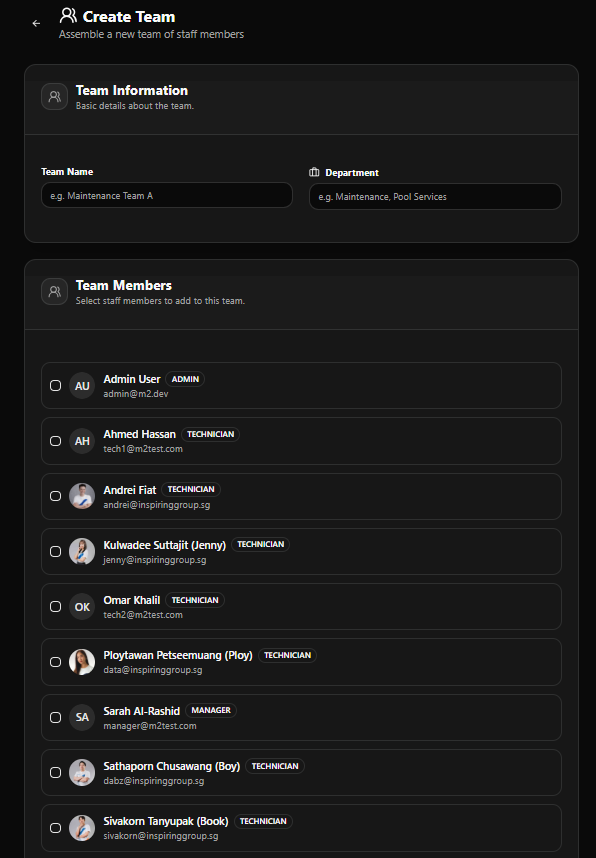
Create Team Form
Section titled “Create Team Form”Access via + Create Team.
Title: Create Team Subtitle: Assemble a new team of staff members
Team Information
Section titled “Team Information”| Field | Notes |
|---|---|
| Team Name | e.g. Maintenance Team A |
| Department | e.g. Maintenance, Pool Services |
Team Members
Section titled “Team Members”Checkbox list of all registered staff — select one or more to include in the team:
| Staff Member | Role |
|---|---|
| Admin User | ADMIN |
| Ahmed Hassan | TECHNICIAN |
| Andrei Fiat | TECHNICIAN |
| Kulwadee Suttajit (Jenny) | TECHNICIAN |
| Omar Khalil | TECHNICIAN |
| Ploytawan Petseemuang (Ploy) | TECHNICIAN |
| Sarah Al-Rashid | MANAGER |
| Sathaporn Chusawang (Boy) | TECHNICIAN |
| Sivakorn Tanyupak (Book) | TECHNICIAN |
Check any number of staff members to add them to the new team simultaneously.