Asset Registry
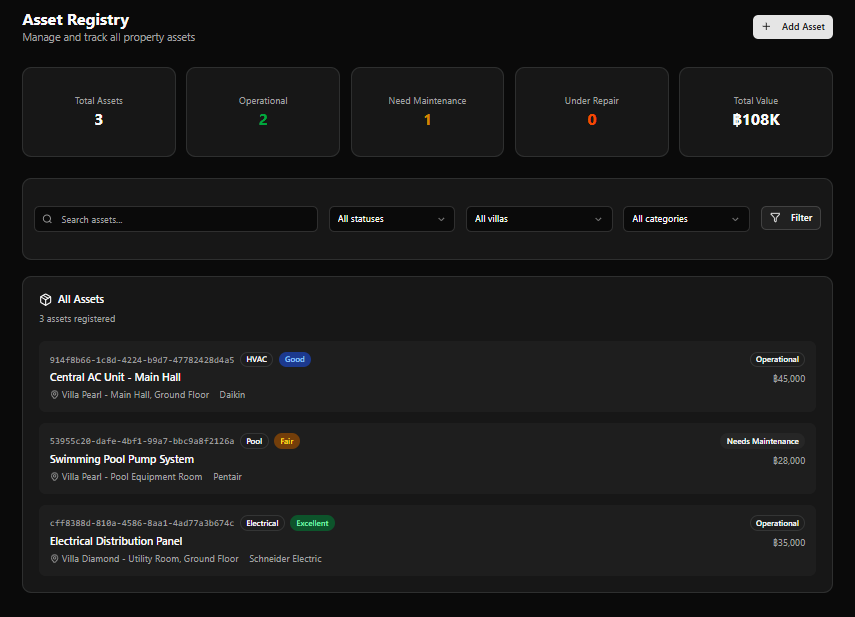
The Asset Registry tracks every significant piece of equipment across all villa properties — HVAC systems, pool equipment, electrical infrastructure, and more. Each asset records its operational status, condition, maintenance dates, and links directly to work order creation.
Page Header
Section titled “Page Header”| Element | Description |
|---|---|
| Title | Asset Registry |
| Subtitle | Manage and track all property assets |
| + Add Asset | Opens the Add Asset form |
KPI Cards
Section titled “KPI Cards”| Card | Colour | Description |
|---|---|---|
| Total Assets | White | All registered assets |
| Operational | Green | Assets in active service |
| Need Maintenance | Yellow | Assets flagged for upcoming maintenance |
| Under Repair | Orange | Assets currently being repaired |
| Total Value | White | Combined purchase cost of all assets (฿) |
Example values (live data): Total: 3 · Operational: 2 · Need Maintenance: 1 · Under Repair: 0 · Total Value: ฿108K
Search & Filter
Section titled “Search & Filter”| Control | Description |
|---|---|
| Search assets… | Full-text search by name, location, or manufacturer |
| All statuses | Filter by operational status |
| All villas | Filter by property |
| All categories | Filter by asset category |
| Filter | Apply combined filters |
Asset List
Section titled “Asset List”The All Assets panel lists all registered equipment. Each row shows:
| Element | Description |
|---|---|
| Asset ID | Full UUID identifier (e.g. 914f8b66-1c8d-4224-b9d7-47782428d4a5) |
| Category badge | e.g. HVAC, Pool, Electrical |
| Condition badge | e.g. Good (blue), Fair (amber), Excellent (green) |
| Asset Name | Display name of the equipment |
| Status badge | e.g. Operational (green), Needs Maintenance (amber) |
| Purchase Cost | Value in USD |
| Location | Villa · Room/Area · Manufacturer |
Current Assets (Example Data)
Section titled “Current Assets (Example Data)”| Asset | Category | Condition | Status | Value | Location | Manufacturer |
|---|---|---|---|---|---|---|
| Central AC Unit - Main Hall | HVAC | Good | Operational | $45,000 | Villa Pearl · Main Hall, Ground Floor | Daikin |
| Swimming Pool Pump System | Pool | Fair | Needs Maintenance | $28,000 | Villa Pearl · Pool Equipment Room | Pentair |
| Electrical Distribution Panel | Electrical | Excellent | Operational | $35,000 | Villa Diamond · Utility Room, Ground Floor | Schneider Electric |
Add Asset Form
Section titled “Add Asset Form”Access via + Add Asset. Back link: ← Back to Assets
The form has four sections:
1. Basic Information
Section titled “1. Basic Information”Core details needed to register the asset
| Field | Required | Notes |
|---|---|---|
| Asset Name | Yes | e.g. Pool Pump System A |
| Category | Yes | Dropdown — Select category |
| Villa | Yes | Dropdown — Select villa |
| Location | Yes | Disabled until a villa is selected; then shows available rooms/areas |
2. Equipment Details
Section titled “2. Equipment Details”Manufacturer, model, and purchase information
| Field | Required | Notes |
|---|---|---|
| Manufacturer | No | e.g. Pentair |
| Model | No | Model number |
| Serial Number | No | Serial number |
| Install Date | No | Date picker |
| Warranty Expiry | No | Date picker |
| Purchase Cost | No | Numeric, default 0.00 |
3. Status & Condition
Section titled “3. Status & Condition”Track operational status and maintenance health
| Field | Required | Notes |
|---|---|---|
| Status | Yes | Default: Operational |
| Condition | Yes | Default: Good |
| Last Maintenance Date | No | Date picker |
| Next Maintenance Date | No | Date picker |
4. Notes & QR Code
Section titled “4. Notes & QR Code”Additional notes and QR tag details
| Field | Notes |
|---|---|
| Notes | Optional notes, usage details, or maintenance hints |
| QR Code | Optional QR code value for physical asset tagging |
Form Actions
Section titled “Form Actions”| Button | Action |
|---|---|
| Cancel | Discard and return to Asset Registry |
| Create Asset | Save and register the asset |
Asset Detail Page
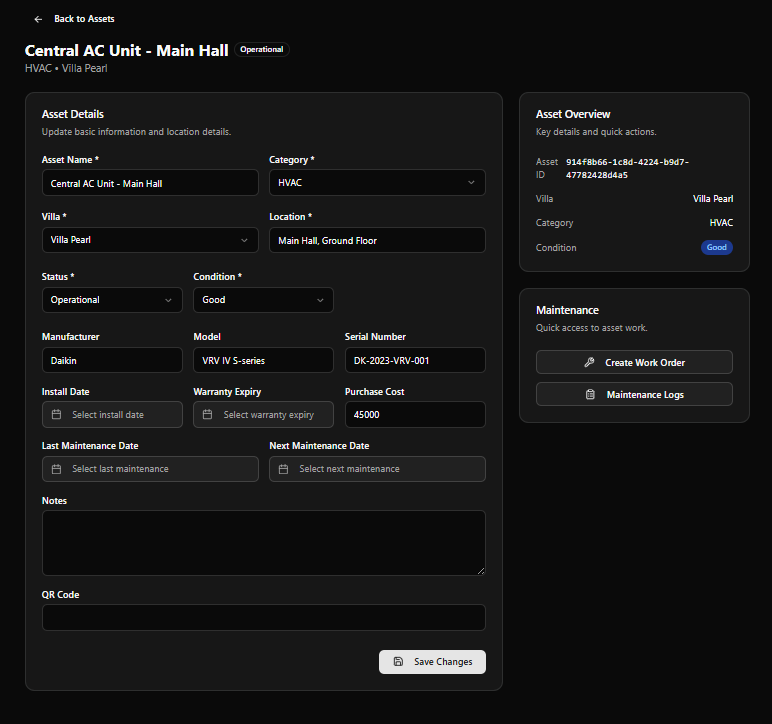
Section titled “Asset Detail Page”Click any asset row to open its full detail and edit page.
Page Header
Section titled “Page Header”| Element | Description |
|---|---|
| Asset Name | e.g. Central AC Unit - Main Hall |
| Status badge | e.g. Operational |
| Breadcrumb | Category · Villa (e.g. HVAC · Villa Pearl) |
| Back link | ← Back to Assets |
Asset Details Panel (Left)
Section titled “Asset Details Panel (Left)”The detail page opens in edit mode — all fields are directly editable.
Update basic information and location details
| Field | Example Value |
|---|---|
| Asset Name | Central AC Unit - Main Hall |
| Category | HVAC |
| Villa | Villa Pearl |
| Location | Main Hall, Ground Floor |
| Status | Operational |
| Condition | Good |
| Manufacturer | Daikin |
| Model | VRV IV S-series |
| Serial Number | DK-2023-VRV-001 |
| Install Date | (empty) |
| Warranty Expiry | (empty) |
| Purchase Cost | 45000 |
| Last Maintenance Date | (empty) |
| Next Maintenance Date | (empty) |
| Notes | (empty) |
| QR Code | (empty) |
Save Changes button at the bottom applies any edits.
Asset Overview Sidebar (Right)
Section titled “Asset Overview Sidebar (Right)”Displays a quick summary of key identifiers:
| Field | Example |
|---|---|
| Asset ID | 914f8b66-1c8d-4224-b9d7-47782428d4a5 |
| Villa | Villa Pearl |
| Category | HVAC |
| Condition | Good badge |
Maintenance Sidebar (Right)
Section titled “Maintenance Sidebar (Right)”Quick-access actions for the asset:
| Button | Action |
|---|---|
| Create Work Order | Opens a new work order pre-linked to this asset |
| Maintenance Logs | View the full service history for this asset |
Asset Condition & Status Reference
Section titled “Asset Condition & Status Reference”Condition Badges
Section titled “Condition Badges”| Badge | Colour | Meaning |
|---|---|---|
| Excellent | Green | Asset is in near-new condition |
| Good | Blue | Asset is functioning well with minor wear |
| Fair | Amber | Asset shows wear — maintenance recommended |
| Poor | Orange | Asset needs attention — risk of failure |
| Critical | Red | Asset is failing — immediate action required |
Status Badges
Section titled “Status Badges”| Badge | Colour | Meaning |
|---|---|---|
| Operational | Green | In active service |
| Needs Maintenance | Amber | Scheduled or overdue maintenance |
| Under Repair | Orange | Currently being repaired |
| Out of Service | Red | Taken offline |
Registering an Asset
Section titled “Registering an Asset”flowchart TD A[Click + Add Asset] --> B[Fill Basic Information\nName · Category · Villa · Location] B --> C[Enter Equipment Details\nManufacturer · Model · Serial · Cost] C --> D[Set Status & Condition\nStatus · Condition · Maintenance Dates] D --> E[Add Notes and QR Code optional] E --> F[Click Create Asset] F --> G[Asset registered\nAppears in Asset Registry] G --> H{Need to act?} H -- Maintenance needed --> I[Create Work Order from Asset Detail] H -- View history --> J[Open Maintenance Logs]