Vendor Management
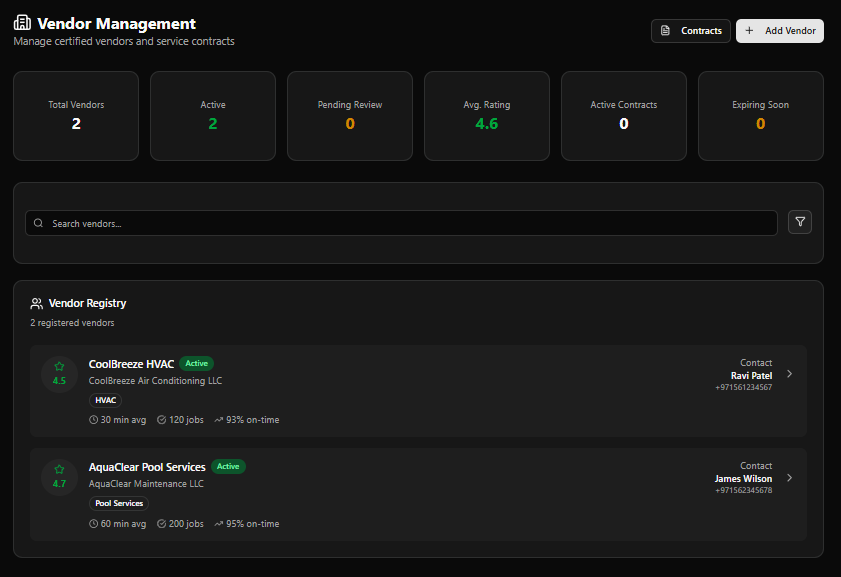
The Vendor Management module maintains the directory of all external suppliers and maintenance partners — their service categories, contact details, legal compliance, performance history, and pricing.
Page Header
Section titled “Page Header”| Element | Description |
|---|---|
| Title | Vendor Management |
| Subtitle | Manage certified vendors and service contracts |
| Contracts | Opens the Contracts management page |
| + Add Vendor | Opens the Vendor Onboarding form |
KPI Cards
Section titled “KPI Cards”| Card | Colour | Description |
|---|---|---|
| Total Vendors | White | All registered vendors |
| Active | Green | Vendors with Active status |
| Pending Review | Amber | Vendors awaiting approval |
| Avg. Rating | Green | Average performance rating across all vendors |
| Active Contracts | White | Currently active service contracts |
| Expiring Soon | Amber | Contracts expiring within the alert window |
Example values (live data): Total: 2 · Active: 2 · Pending Review: 0 · Avg. Rating: 4.6 · Active Contracts: 0 · Expiring Soon: 0
Search & Filter
Section titled “Search & Filter”| Control | Description |
|---|---|
| Search vendors… | Full-text search by name or category |
| Filter icon | Apply additional filters |
Vendor Registry
Section titled “Vendor Registry”The Vendor Registry panel lists all registered vendors. Each row shows:
| Element | Description |
|---|---|
| Star rating | Vendor performance rating (e.g. 4.5 ★) |
| Vendor Name | Trade name |
| Status badge | e.g. Active (green) |
| Legal name | Registered company name |
| Category badge | Service category (e.g. HVAC, Pool Services) |
| Avg response time | Average time to respond to a job |
| Total jobs | Number of completed jobs |
| On-time rate | Percentage of jobs completed on time |
| Contact | Primary contact name and phone, with › link to profile |
Current Vendors (Live Data)
Section titled “Current Vendors (Live Data)”| Vendor | Legal Name | Category | Rating | Avg Response | Jobs | On-Time | Contact |
|---|---|---|---|---|---|---|---|
| CoolBreeze HVAC | CoolBreeze Air Conditioning LLC | HVAC | 4.5 | 30 min | 120 | 93% | Ravi Patel · +971561234567 |
| AquaClear Pool Services | AquaClear Maintenance LLC | Pool Services | 4.7 | 60 min | 200 | 95% | James Wilson · +971562345678 |
Vendor Onboarding Form
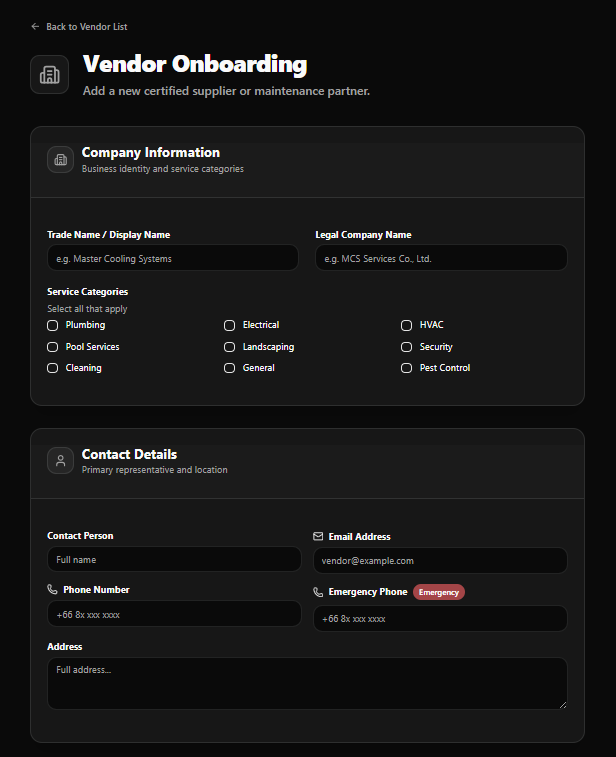
Section titled “Vendor Onboarding Form”Access via + Add Vendor. Back link: ← Back to Vendor List
Title: Vendor Onboarding Subtitle: Add a new certified supplier or maintenance partner.
Company Information
Section titled “Company Information”Business identity and service categories
| Field | Notes |
|---|---|
| Trade Name / Display Name | e.g. Master Cooling Systems |
| Legal Company Name | e.g. MCS Services Co., Ltd. |
Service Categories — checkboxes, select all that apply:
| Column 1 | Column 2 | Column 3 |
|---|---|---|
| Plumbing | Electrical | HVAC |
| Pool Services | Landscaping | Security |
| Cleaning | General | Pest Control |
Contact Details
Section titled “Contact Details”Primary representative and location
| Field | Notes |
|---|---|
| Contact Person | Full name |
| Email Address | e.g. [email protected] |
| Phone Number | e.g. +66 8x xxx xxxx |
| Emergency Phone | Marked with Emergency badge — 24/7 contact number |
| Address | Full address |
Legal & Compliance
Section titled “Legal & Compliance”Licenses, insurance, and certifications
| Field | Notes |
|---|---|
| Tax ID | Tax identification number |
| License Number | Business or trade license number |
| Insurance Expiry | Date picker |
| Certifications | Type certification name and press Enter (e.g. ISO 9001:2015) — use Add to save each entry |
Pricing & Status
Section titled “Pricing & Status”Account status and additional notes
| Field | Notes |
|---|---|
| Account Status | Default: Pending Review — new vendors are usually pending review before activation |
| Notes | Additional information about this vendor |
Form Actions
Section titled “Form Actions”| Button | Action |
|---|---|
| Cancel | Discard and return to Vendor Registry |
| Register Vendor | Save and create the vendor profile |
Vendor Detail Page
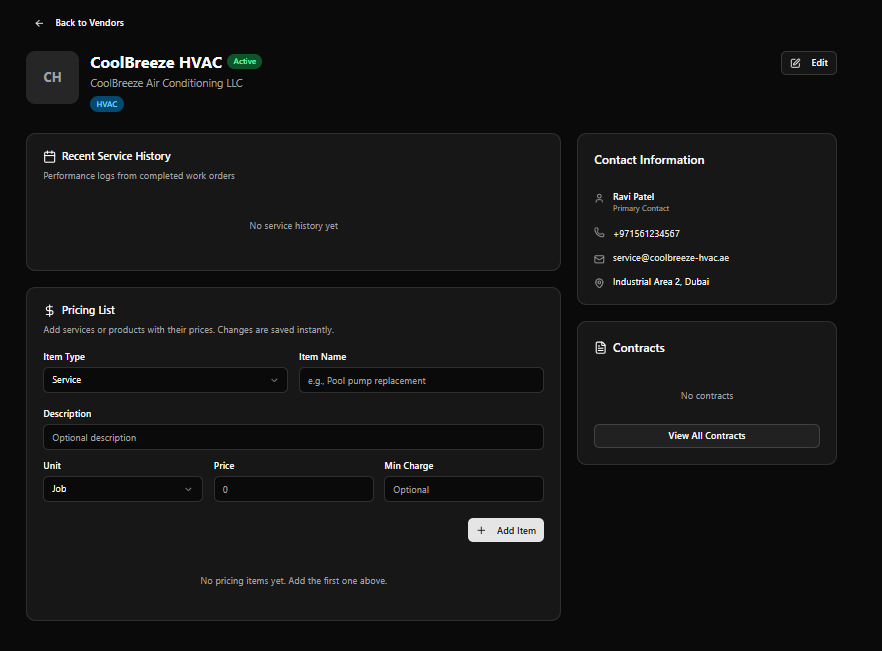
Section titled “Vendor Detail Page”Click any vendor row to open the full profile.
Page Header
Section titled “Page Header”| Element | Description |
|---|---|
| Avatar | Initials (e.g. CH for CoolBreeze HVAC) |
| Vendor Name | e.g. CoolBreeze HVAC |
| Status badge | e.g. Active (green) |
| Legal name | e.g. CoolBreeze Air Conditioning LLC |
| Category badge | e.g. HVAC |
| Edit | Opens the vendor profile in edit mode |
| Back link | ← Back to Vendors |
Recent Service History
Section titled “Recent Service History”Performance logs from completed work orders
Shows completed jobs linked to this vendor. Displays No service history yet when empty.
Pricing List
Section titled “Pricing List”Add services or products with their prices. Changes are saved instantly.
| Field | Notes |
|---|---|
| Item Type | Default: Service |
| Item Name | e.g. Pool pump replacement |
| Description | Optional description |
| Unit | Default: Job |
| Price | Numeric, default 0 |
| Min Charge | Optional minimum charge |
Use + Add Item to add pricing entries. All changes save immediately.
Displays No pricing items yet. Add the first one above. when empty.
Contact Information (Sidebar)
Section titled “Contact Information (Sidebar)”| Field | Example |
|---|---|
| Name & Role | Ravi Patel — Primary Contact |
| Phone | +971561234567 |
| [email protected] | |
| Address | Industrial Area 2, Dubai |
Contracts (Sidebar)
Section titled “Contracts (Sidebar)”Shows active service contracts for this vendor. Displays No contracts when none exist.
View All Contracts button opens the full contracts list for this vendor.