Asset Detail Page
Clicking any Asset ID (e.g. HW-00001) anywhere in M7 opens the full asset detail page.
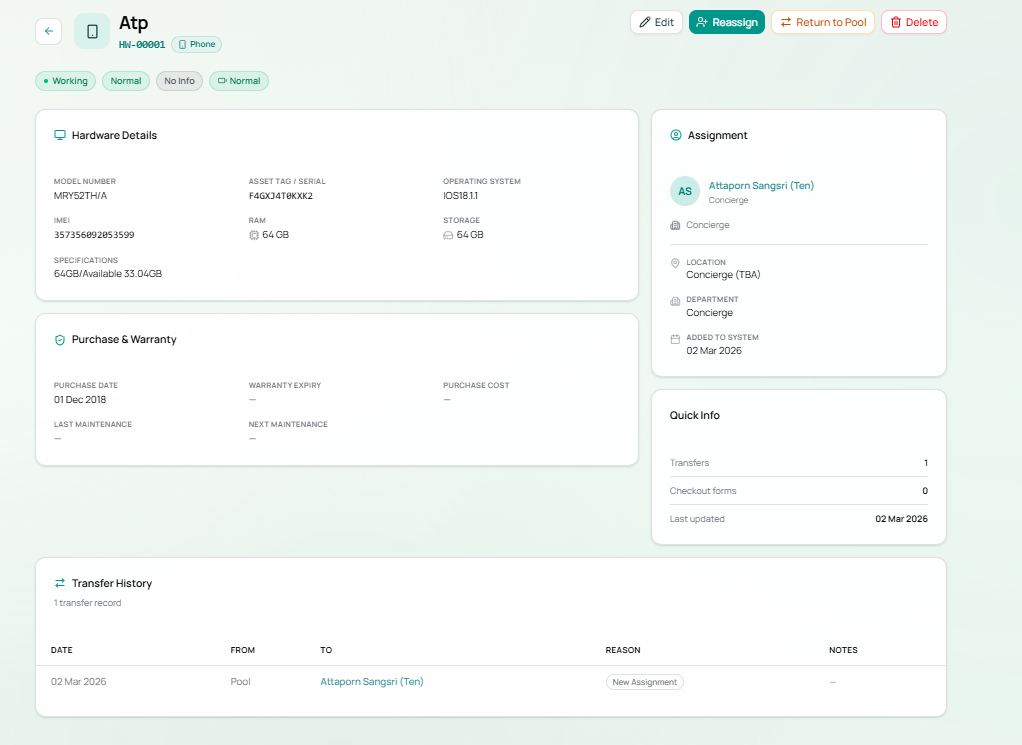
Header
Section titled “Header”Displays the asset name, asset ID, and category badge at the top.
Below the name, a row of status badges gives an instant health snapshot:
| Badge | Possible Values |
|---|---|
| Operational Status | Working (green), Unassigned (grey) |
| Condition | Normal, Damaged, Under Repair |
| Warranty | Active, Expired, No Info |
| Battery | Good, Degraded, Normal, Unknown |
Action Buttons (top right)
Section titled “Action Buttons (top right)”| Button | Action |
|---|---|
| Edit | Edit any field on this asset |
| Reassign | Reassign the asset to a different employee (teal) |
| Return to Pool | Unassign — moves asset back to the Asset Pool |
| Delete | Permanently delete this asset record (red — irreversible) |
Hardware Details Panel
Section titled “Hardware Details Panel”Full technical specification of the device.
| Field | Description | Example |
|---|---|---|
| Model Number | Official model code | MRY52TH/A |
| Asset Tag / Serial | Physical serial number or tag | F4GXJ4T0KXK2 |
| Operating System | Installed OS and version | iOS 18.1.1, Windows 11, macOS Sonoma |
| IMEI | Mobile IMEI (phones only) | 357356092053599 |
| RAM | Memory in GB | 64 GB, 16 GB |
| Storage | Storage capacity | 64 GB, 512 GB |
| Specifications | Free-text technical notes | 64GB/Available 33.04GB |
Purchase & Warranty Panel
Section titled “Purchase & Warranty Panel”Financial and lifecycle information for the asset.
| Field | Description |
|---|---|
| Purchase Date | Date the asset was acquired |
| Warranty Expiry | Date warranty ends (— if not recorded) |
| Purchase Cost | Price paid in THB (— if not recorded) |
| Last Maintenance | Date of most recent maintenance (— if none) |
| Next Maintenance | Scheduled next maintenance date (— if none) |
Assignment Panel (right sidebar)
Section titled “Assignment Panel (right sidebar)”Shows the current assignee with their profile details.
| Field | Description |
|---|---|
| Employee name | Clickable link to their employee profile |
| Role | Their job title |
| Location | Physical location (e.g. Concierge (TBA), Phuket Office) |
| Department | Their department |
| Added to System | Date this asset record was first created |
If the asset is unassigned, this panel shows — Unassigned (Asset Pool) —.
Quick Info Panel (right sidebar)
Section titled “Quick Info Panel (right sidebar)”| Field | Description |
|---|---|
| Transfers | Total number of times this asset has been assigned/transferred |
| Checkout forms | Number of associated checkout forms |
| Last updated | Date the asset record was last modified |
Transfer History
Section titled “Transfer History”A full log of every assignment change for this asset.
| Column | Description |
|---|---|
| Date | When the transfer occurred |
| From | Previous holder (Pool if from unassigned) |
| To | New holder (employee name, or Pool if returned) |
| Reason | New Assignment, Bulk Import, Return, etc. |
| Notes | Additional context |
Asset Lifecycle Flow
Section titled “Asset Lifecycle Flow”stateDiagram-v2 [*] --> Pool : Created (unassigned) Pool --> Assigned : Assign to employee Assigned --> Pool : Return to Pool Assigned --> Assigned : Reassign to different employee Pool --> [*] : Delete Assigned --> [*] : DeleteExample Asset — HW-00001 (Atp)
Section titled “Example Asset — HW-00001 (Atp)”| Field | Value |
|---|---|
| Name | Atp |
| Category | Phone |
| Model | MRY52TH/A |
| Serial / Tag | F4GXJ4T0KXK2 |
| OS | iOS 18.1.1 |
| IMEI | 357356092053599 |
| RAM / Storage | 64 GB / 64 GB |
| Purchase Date | 01 Dec 2018 |
| Warranty | — (No Info) |
| Assigned To | Attaporn Sangsri (Ten) — Concierge |
| Location | Concierge (TBA) |
| Transfers | 1 (Pool → Attaporn Sangsri, 02 Mar 2026, New Assignment) |