Villa Profile View
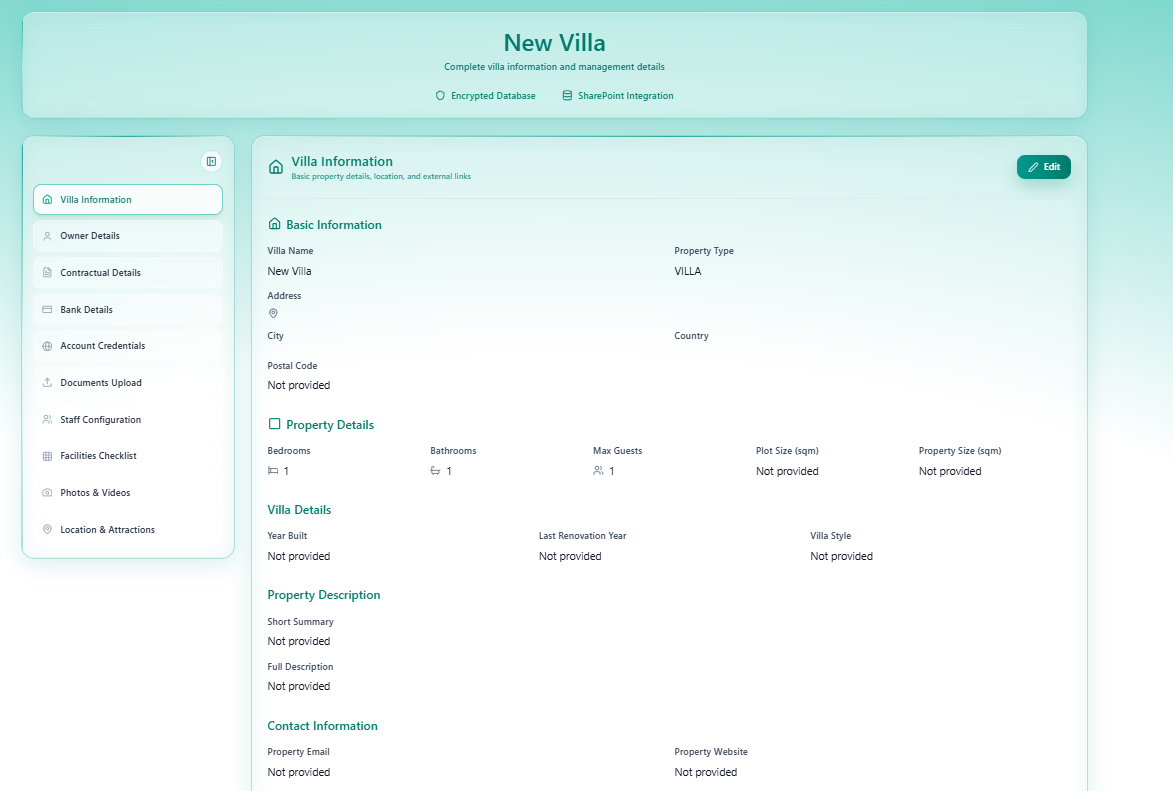
The Villa Profile is a read-only page that displays all data collected during the 11-step onboarding wizard for a specific villa. It is the single source of truth for a property’s complete record.
Accessing the Villa Profile
Section titled “Accessing the Villa Profile”From the My Villas page, click the 👁️ View icon on any villa row. This opens the full profile in view mode.
Page Layout
Section titled “Page Layout”Header
Section titled “Header”| Element | Description |
|---|---|
| Villa Name | The property name (e.g. New Villa, Sea Theatre Kata: Villa Mare') |
| Subtitle | Complete villa information and management details |
| Encrypted Database badge | Confirms all data is stored encrypted |
| SharePoint Integration badge | Confirms file storage is connected |
Left Sidebar
Section titled “Left Sidebar”The sidebar lists all 10 data sections — one per wizard step. Click any section to jump directly to it:
| Sidebar Item | Corresponding Wizard Step |
|---|---|
| Villa Information | Step 1 |
| Owner Details | Step 2 |
| Contractual Details | Step 3 |
| Bank Details | Step 4 |
| Account Credentials | Step 5 |
| Documents Upload | Step 6 |
| Staff Configuration | Step 7 |
| Facilities Checklist | Step 8 |
| Photos & Videos | Step 9 |
| Location & Attractions | Step 10 |
Main Content Area
Section titled “Main Content Area”Each section shows all fields with their saved values, or Not provided if the field was left empty during the wizard.
An Edit button appears at the top right of each section — clicking it takes you back to the corresponding wizard step to update the data.
Villa Information Section (Example)
Section titled “Villa Information Section (Example)”| Field | Displays |
|---|---|
| Villa Name | Entered name, or New Villa if unnamed |
| Property Type | e.g. VILLA |
| Address | Full address, or empty |
| City / Country / Postal Code | Location fields, or Not provided |
| Bedrooms / Bathrooms / Max Guests | Property dimensions |
| Plot Size / Property Size (sqm) | Area figures, or Not provided |
| Year Built / Last Renovation / Villa Style | Historical details |
| Short Summary / Full Description | Marketing copy |
| Property Email / Website | Contact details |
Purpose
Section titled “Purpose”The Villa Profile is used to:
- Verify that all onboarding data was entered correctly before submission
- Spot gaps —
Not providedfields indicate sections that still need completing - Edit specific sections without re-running the full wizard
- Share with managers or the admin team for review
This page is read-only by default. Use the Edit button on any section to make changes.