Preventive Maintenance (PMP)
The PMP (Preventive Maintenance Program) module lets you define reusable maintenance templates and schedule them to recur automatically across villa properties. Scheduled PMP tasks appear alongside work orders on the Work Orders calendar.
Access PMP Templates from:
- Dashboard → Preventive Maintenance (breadcrumb)
- Work Orders → PMP Templates button
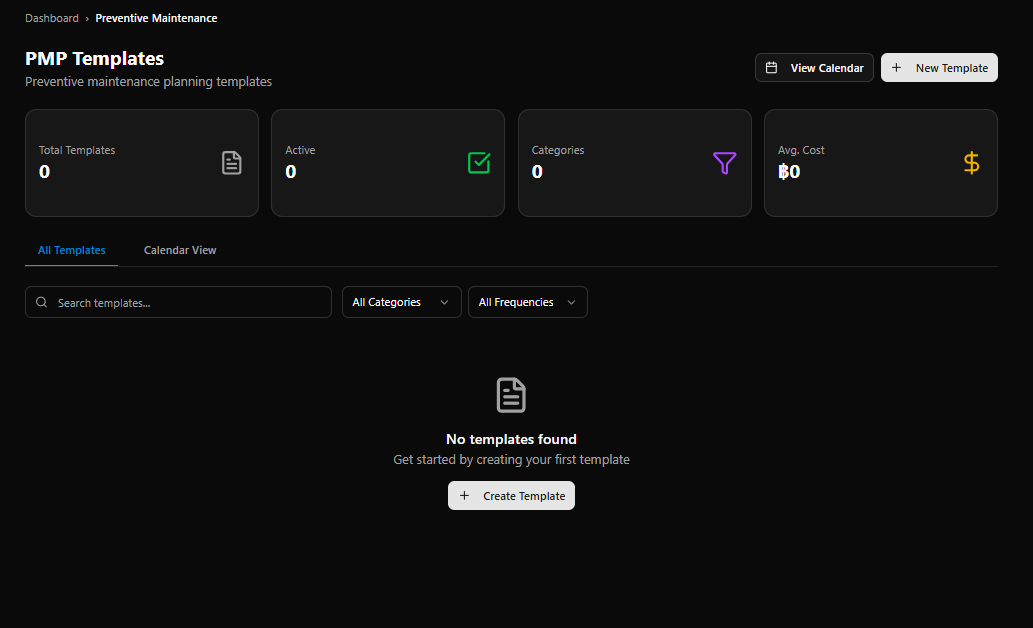
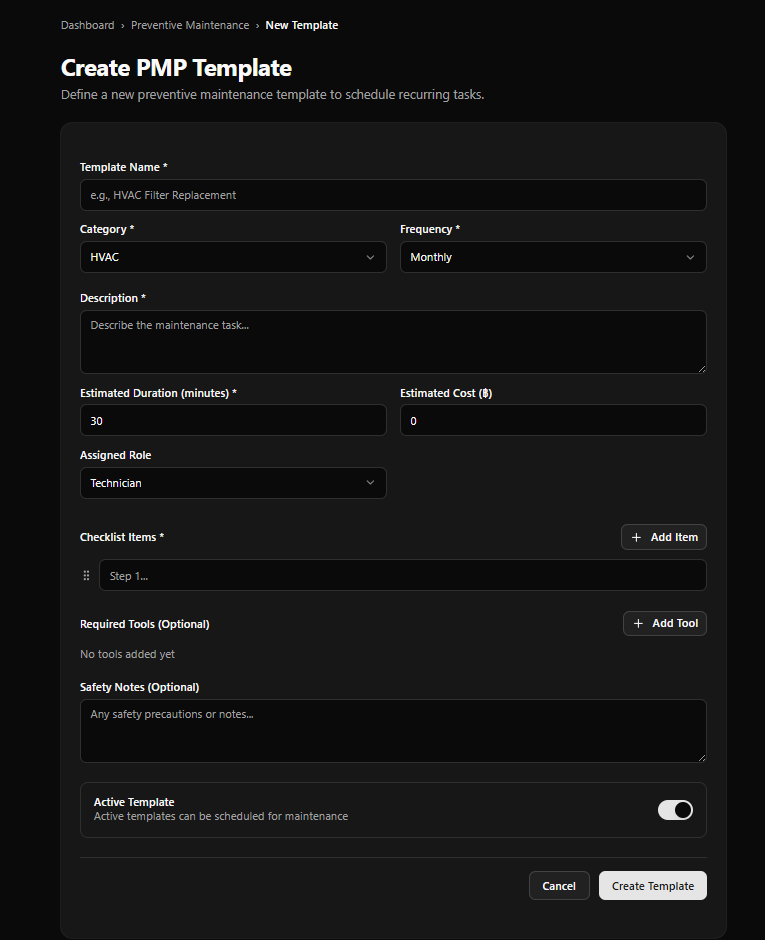
PMP Templates Page
Section titled “PMP Templates Page”Page Header
Section titled “Page Header”| Element | Description |
|---|---|
| Title | PMP Templates |
| Subtitle | Preventive maintenance planning templates |
| View Calendar | Opens the calendar view of all scheduled PMP tasks |
| + New Template | Opens the Create PMP Template form |
KPI Cards
Section titled “KPI Cards”| Card | Color | Description |
|---|---|---|
| Total Templates | Gray | All templates in the system |
| Active | Green | Templates currently enabled for scheduling |
| Categories | Purple | Number of distinct categories in use |
| Avg. Cost | Yellow | Average estimated cost per template (฿) |
| Tab | Description |
|---|---|
| All Templates | List of all PMP templates with search and filters |
| Calendar View | Calendar showing all scheduled PMP occurrences |
Filters
Section titled “Filters”| Filter | Description |
|---|---|
| Search templates… | Text search by template name |
| All Categories | Filter by maintenance category |
| All Frequencies | Filter by recurrence frequency |
When no templates exist, the empty state shows:
No templates found — Get started by creating your first template + Create Template button
Create PMP Template Form
Section titled “Create PMP Template Form”Access via + New Template or + Create Template.
Breadcrumb: Dashboard › Preventive Maintenance › New Template
Form Fields
Section titled “Form Fields”| Field | Required | Notes |
|---|---|---|
| Template Name | Yes | e.g. HVAC Filter Replacement |
| Category | Yes | Default shown: HVAC |
| Frequency | Yes | Default shown: Monthly |
| Description | Yes | Describe the maintenance task |
| Estimated Duration (minutes) | Yes | Default: 30 |
| Estimated Cost (฿) | No | Default: 0 |
| Assigned Role | No | Default: Technician |
Checklist Items
Section titled “Checklist Items”Define the steps required to complete this maintenance task.
- Click + Add Item to add a checklist step
- Each item has a text field (e.g.
Step 1...) - Items can be reordered via drag handle (⠿)
- Required field — at least one checklist item must be provided
Required Tools (Optional)
Section titled “Required Tools (Optional)”- Click + Add Tool to list tools needed for the task
- Displays “No tools added yet” when empty
Safety Notes (Optional)
Section titled “Safety Notes (Optional)”Free-text field for any safety precautions or notes relevant to the task.
Active Template Toggle
Section titled “Active Template Toggle”| State | Meaning |
|---|---|
| On (default) | Template is active and can be scheduled for maintenance |
| Off | Template is saved but will not appear in scheduling options |
Form Actions
Section titled “Form Actions”| Button | Action |
|---|---|
| Cancel | Discard and return to PMP Templates list |
| Create Template | Save and create the template |
Template → Schedule Flow
Section titled “Template → Schedule Flow”flowchart TD A[Create PMP Template\nName · Category · Frequency · Checklist] --> B{Active Template?} B -- Yes --> C[Template available for scheduling] B -- No --> D[Template saved — inactive] C --> E[Schedule PMP\nAssign to villa / asset + set start date] E --> F[System generates recurrences\nbased on frequency] F --> G[PMP tasks appear on\nWork Orders Calendar] G --> H[Technician completes task\nvia Work Order]