Emergency Response
The Emergency Response module provides a dedicated command centre for critical incidents across villa properties. It centralises active incident monitoring, response team management, escalation levels, and quick access to emergency contacts and critical vendors.
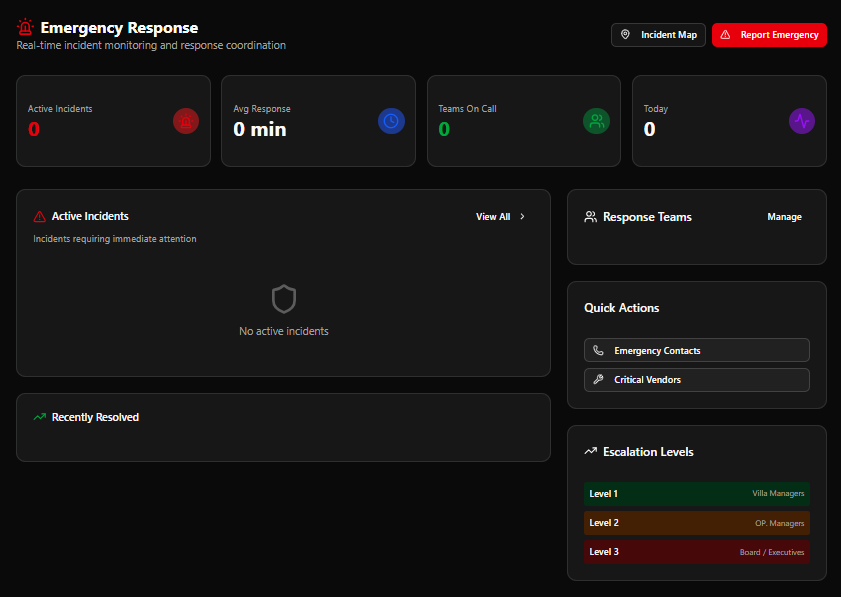
Page Header
Section titled “Page Header”| Element | Description |
|---|---|
| Title | Emergency Response |
| Subtitle | Real-time incident monitoring and response coordination |
| Incident Map | Opens a map view showing the locations of active incidents |
| Report Emergency | Red button — opens the emergency reporting flow immediately |
KPI Cards
Section titled “KPI Cards”| Card | Colour | Description |
|---|---|---|
| Active Incidents | Red | Incidents currently open and requiring attention |
| Avg Response | Blue | Average response time in minutes |
| Teams On Call | Green | Response teams currently on duty |
| Today | Purple | Total incidents reported today |
Example values (live data): Active: 0 · Avg Response: 0 min · Teams On Call: 0 · Today: 0
Active Incidents Panel
Section titled “Active Incidents Panel”Incidents requiring immediate attention
Displays all open emergency incidents. Each incident row shows status, location, severity, and assigned response team.
- View All → link opens the full incident list
- When no incidents are active:
No active incidents
Recently Resolved Panel
Section titled “Recently Resolved Panel”Displays a log of recently closed or resolved incidents for reference.
Response Teams (Sidebar)
Section titled “Response Teams (Sidebar)”Lists all configured emergency response teams and their current on-call status.
- Manage link opens the Response Teams configuration page
Quick Actions (Sidebar)
Section titled “Quick Actions (Sidebar)”| Button | Action |
|---|---|
| Emergency Contacts | Opens the emergency contact directory |
| Critical Vendors | Lists vendors flagged as critical for emergency response |
Escalation Levels (Sidebar)
Section titled “Escalation Levels (Sidebar)”Defines the notification chain when an incident is not resolved within its response window:
| Level | Colour | Notified Parties |
|---|---|---|
| Level 1 | Green | Villa Managers |
| Level 2 | Amber | OP. Managers |
| Level 3 | Red | Board / Executives |
Escalation automatically advances through levels if the incident remains unresolved.
Emergency Response Flow
Section titled “Emergency Response Flow”flowchart TD A[Incident detected or reported] --> B[Click Report Emergency] B --> C[Incident created\nStatus: Active] C --> D[Level 1 notified\nVilla Managers] D --> E{Resolved?} E -- Yes --> F[Incident closed\nMoved to Recently Resolved] E -- No --> G[Escalate to Level 2\nOP. Managers] G --> H{Resolved?} H -- Yes --> F H -- No --> I[Escalate to Level 3\nBoard / Executives] I --> J[Executive intervention\nIncident resolved] J --> F