M7 — Hardware Management
M7 is the company’s internal hardware asset management system. It gives your team a single place to register all equipment, assign devices to employees, monitor warranty status, and maintain a full audit trail of every asset movement.
Live application: m7.inspiringlivingsolutions.com
What M7 Does
Section titled “What M7 Does”| Capability | Description |
|---|---|
| Asset Registry | Central database of all 79+ company hardware items |
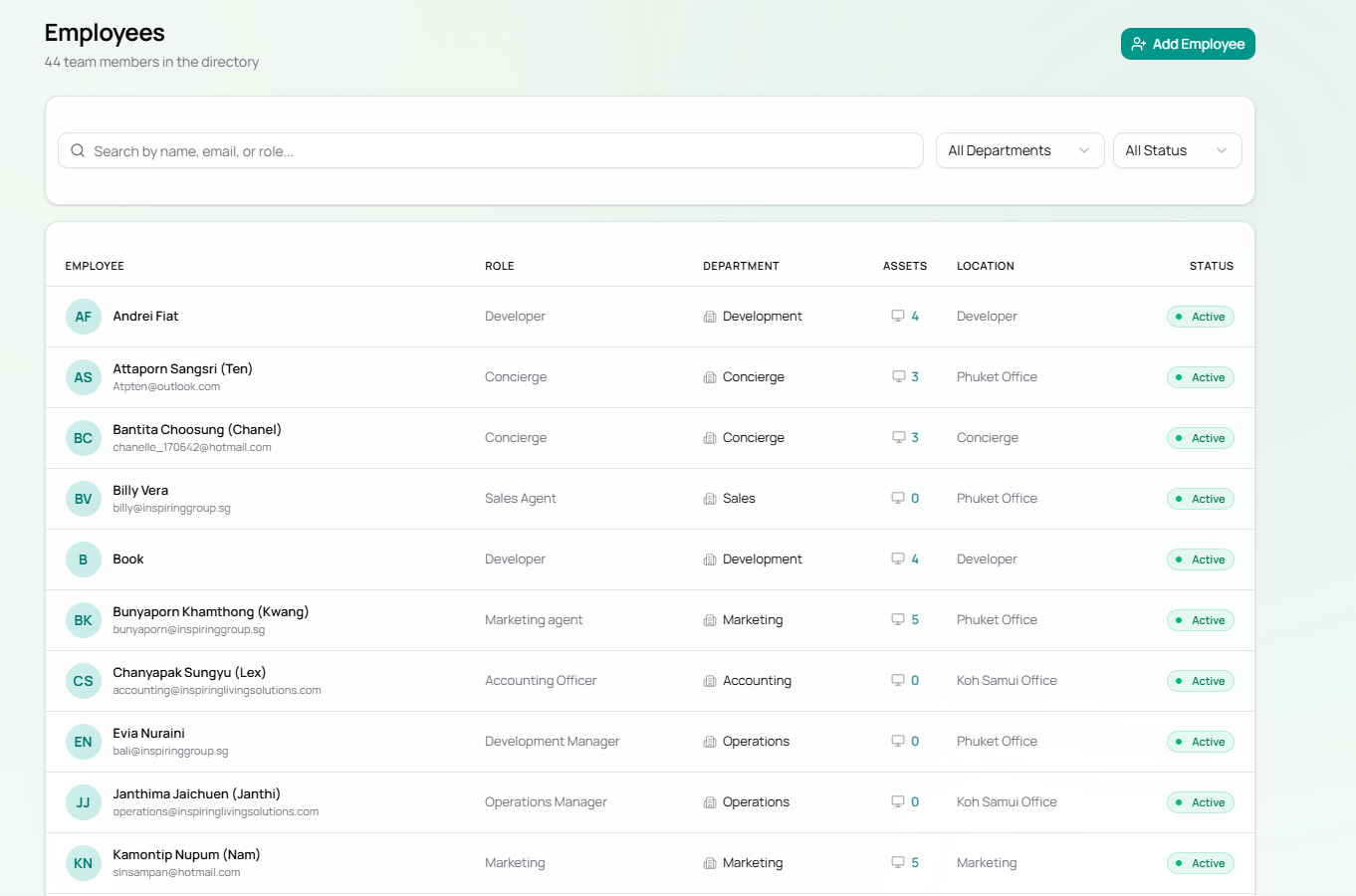
| Employee Directory | 44 staff members across 10 departments |
| Asset Assignment | Link any device to an employee or leave it in the pool |
| Warranty Tracking | Monitor active, expiring, and expired warranties |
| Asset Pool | Unassigned equipment available for new hires |
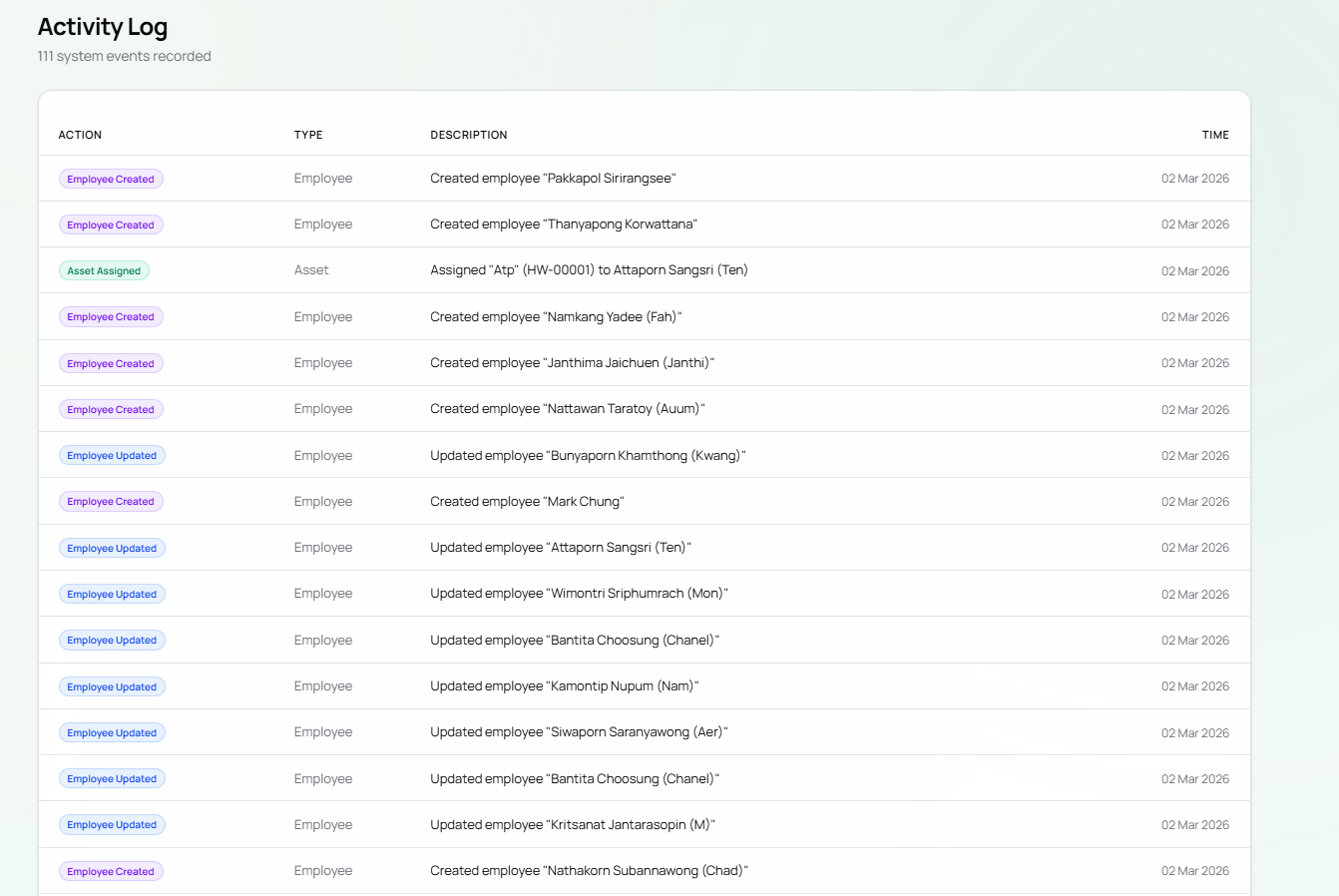
| Activity Log | Full audit trail of every create, update, and assign event |
| Reports | Hardware spend and status reporting |
Navigation
Section titled “Navigation”The top navigation bar provides access to all sections:
| Section | Purpose |
|---|---|
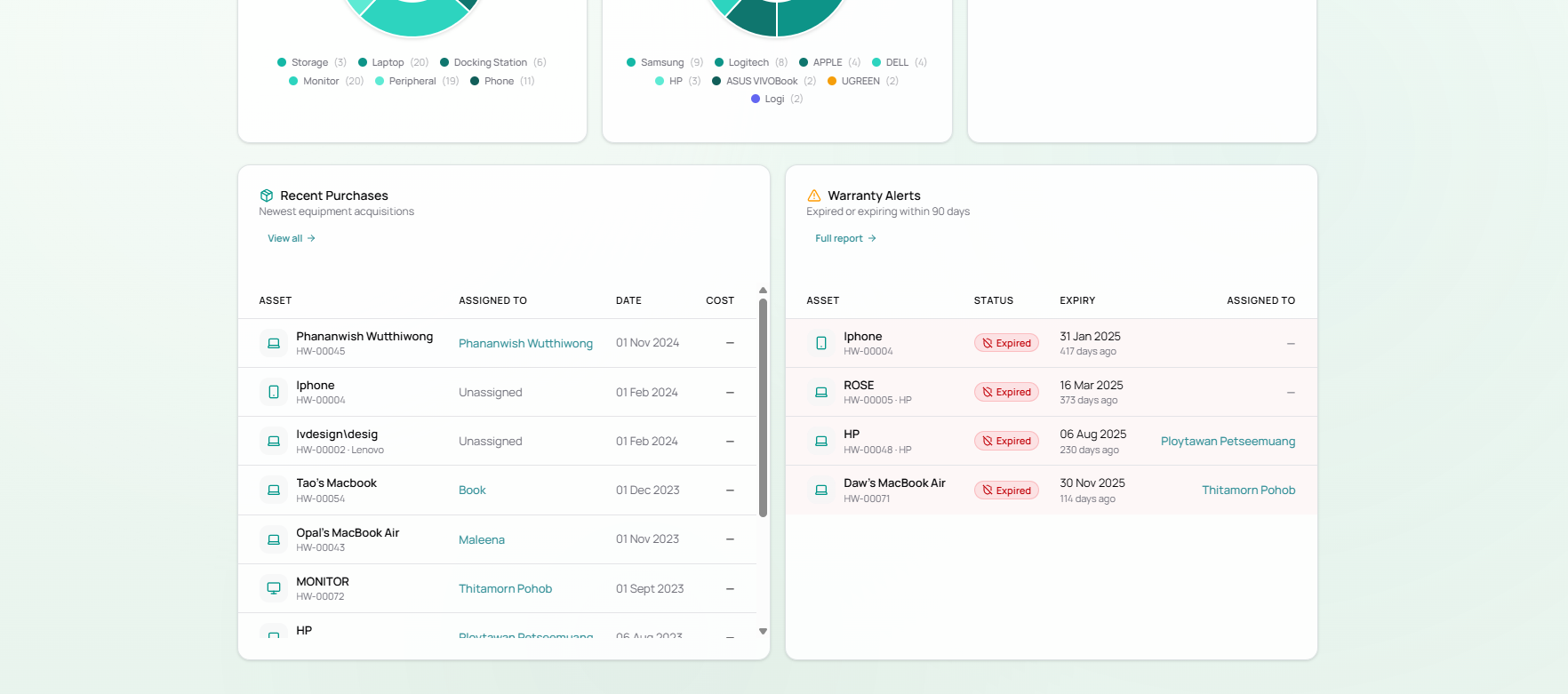
| Dashboard | Overview metrics, charts, recent purchases, warranty alerts |
| Employees | Staff directory — view and add team members |
| Assets | Full asset registry with search and filters |
| Asset Pool | Available (unassigned) equipment |
| Add Asset | Quick-access shortcut to register new hardware |
| Reports | Hardware reports and spend summaries |
| Departments | Department management |
| Activity | System-wide audit log |
Current Inventory Snapshot
Section titled “Current Inventory Snapshot”As of the latest data:
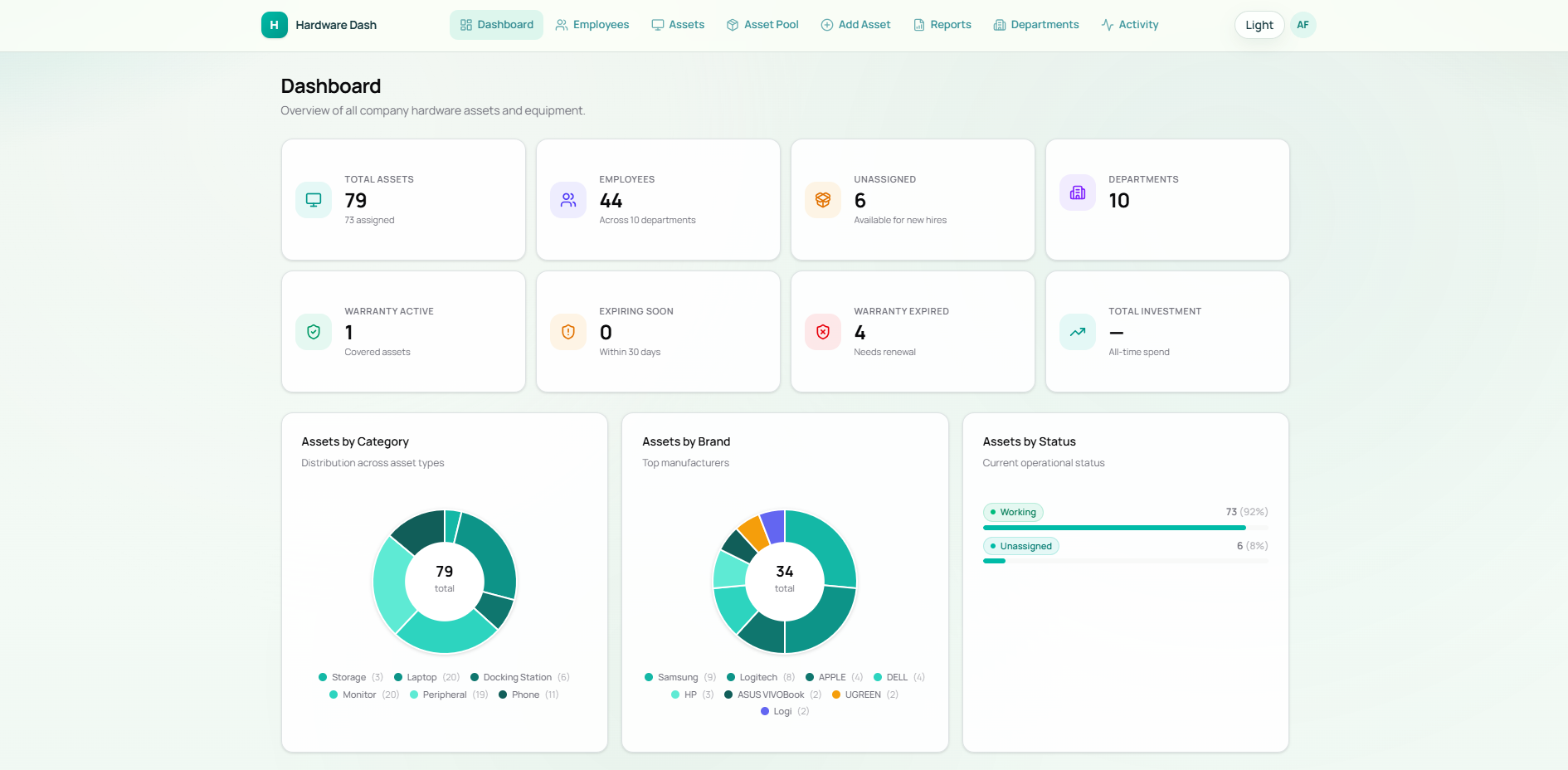
- 79 total assets — 73 assigned, 6 in the asset pool
- 44 employees across 10 departments
- Asset categories: Laptop (20), Monitor (20), Peripheral (19), Phone (11), Docking Station (6), Storage (3)
- Top brands: Samsung (9), Logitech (8), Apple (4), Dell (4), HP (3), ASUS VIVOBook (2)
- Warranty status: 1 active, 4 expired, 0 expiring within 30 days
Key Workflows
Section titled “Key Workflows”- Adding a New Asset
- Assigning an Asset to an Employee
- Returning / Unassigning Equipment
- Verifying Equipment
System Architecture
Section titled “System Architecture”graph TD A[Staff Member] -->|Login via Auth Service| B[M7 Hardware Dash] B --> C[Dashboard] B --> D[Employees] B --> E[Assets] B --> F[Asset Pool] B --> G[Reports] B --> H[Activity Log] E -->|Assign| D E -->|Unassigned| F F -->|Assign to employee| D H -->|Records all changes| I[(Database)] D --> I E --> IDeveloper Reference
Section titled “Developer Reference”This section covers the technical architecture, stack, and onboarding steps for developers working on M7.
Tech Stack
Section titled “Tech Stack”| Layer | Technology | Version |
|---|---|---|
| Framework | TanStack Start (React 19 + SSR) | 1.132.0 |
| Language | TypeScript (strict mode) | 5.7.2 |
| Runtime | Node.js | 20+ |
| Build Tool | Vite | 7.1.7 |
| Database | PostgreSQL | 17 (Docker) / 12+ (prod) |
| ORM | Prisma + @prisma/adapter-pg | 7.2.0 |
| Routing | TanStack Router (file-based) | 1.132.0 |
| Server State | TanStack Query (React Query) | 5.66.5 |
| UI Primitives | Radix UI + Shadcn UI | 1.4.3 |
| Styling | Tailwind CSS | 4.1.18 |
| Validation | Zod | 4.1.11 |
| Env Validation | @t3-oss/env-core | 0.13.8 |
| Linting/Format | Biome | 2.2.4 |
| Testing | Vitest + Testing Library | 3.0.5 |
System Architecture
Section titled “System Architecture”graph TB subgraph Client ["Browser (React 19 + SSR)"] UI["TanStack Router Pages"] RQ["TanStack Query Cache"] end
subgraph Server ["Node.js SSR Server (TanStack Start)"] SF["Server Functions (RPC)"] ZOD["Zod Validation"] PRISMA["Prisma ORM"] end
subgraph DB ["PostgreSQL 17"] DEPT["departments"] EMP["employees"] ASSET["assets"] TH["transfer_history"] CF["checkout_forms"] AL["activity_logs"] end
UI -->|"useQuery / useMutation"| RQ RQ -->|"createServerFn() RPC call"| SF SF --> ZOD ZOD --> PRISMA PRISMA --> DBNote: M7 does not currently connect to any other ILS microservices and has no shared auth service integration. Authentication is not yet implemented.
Folder Structure
Section titled “Folder Structure”hardware-dash/├── src/│ ├── routes/ # File-based pages (TanStack Router)│ │ ├── __root.tsx # Root layout + QueryClient context│ │ ├── index.tsx # Dashboard│ │ ├── assets.index.tsx # Asset inventory list│ │ ├── assets.$assetId.tsx # Asset detail view│ │ ├── assets.new.tsx # Create asset form│ │ ├── employees.index.tsx # Employee directory│ │ ├── employees.$employeeId.tsx # Employee profile│ │ ├── employees.new.tsx # Create employee form│ │ ├── pool.tsx # Unassigned asset pool│ │ ├── reports.tsx # Analytics & reports│ │ ├── departments.tsx # Department management│ │ └── activity.tsx # Audit log│ ├── server/│ │ └── functions.ts # All server-side RPC functions (~1,600 lines)│ ├── components/│ │ ├── Header.tsx / Footer.tsx / StatusBadge.tsx / ThemeToggle.tsx│ │ └── ui/ # 16 Shadcn UI primitives│ ├── lib/│ │ ├── site.ts # Constants, formatters, enum label maps│ │ └── utils.ts # Utility functions│ ├── db.ts # Prisma client singleton│ ├── env.ts # Environment variable validation (Zod)│ └── styles.css # Global styles + Tailwind directives├── prisma/│ ├── schema.prisma # Database schema (source of truth)│ └── seed.ts # CSV import seed script├── docker-compose.yml # Local PostgreSQL 17 setup└── .env.example # Environment variable templateEnvironment Variables
Section titled “Environment Variables”| Variable | Required | Description |
|---|---|---|
DATABASE_URL | Yes | PostgreSQL connection string: postgresql://USER:PASS@HOST:PORT/DB |
SERVER_URL | No | Base URL for server functions in SSR context |
VITE_APP_TITLE | No | Custom app title shown in the browser tab |
Local Development Setup
Section titled “Local Development Setup”# 1. Install dependenciesnpm install
# 2. Configure environmentcp .env.example .env.local
# 3. Start local PostgreSQL (Docker)docker compose up -d
# 4. Sync schema and generate Prisma clientnpm run db:generatenpm run db:push
# 5. Seed initial data from CSVnpm run db:seed
# 6. Start dev server (SSR, port 3000)npm run devKey Scripts
Section titled “Key Scripts”| Command | Purpose |
|---|---|
npm run dev | Dev server with SSR hot reload (port 3000) |
npm run build | Production build → .output/ |
npm run db:generate | Re-generate Prisma client after schema changes |
npm run db:push | Push schema to DB without a migration file |
npm run db:migrate | Create and apply a migration file |
npm run db:studio | Prisma Studio web GUI |
npm run db:seed | Import CSV data |
npm run test | Run Vitest |
npm run check | Biome lint + format check |
Key Design Patterns
Section titled “Key Design Patterns”Server Functions (RPC) — All data operations use createServerFn() from TanStack Start. These are typed RPC calls, not REST endpoints. Input is validated with Zod before the handler runs.
Data Fetching — Every route uses useQuery for reads and useMutation for writes. Mutations invalidate relevant query keys to trigger background refetches.
Activity Logging — Every write operation records an entry in the ActivityLog table, providing a full audit trail without database triggers.
Technical Documentation
Section titled “Technical Documentation”- M7 API Reference — All server functions, inputs, outputs
- M7 Database Schema — Full schema with ER diagram
Known Limitations
Section titled “Known Limitations”| Area | Status |
|---|---|
| Authentication | Not implemented — all routes are publicly accessible |
| Authorization | No RBAC |
| File Uploads | photoUrl field exists but storage provider not connected |
| QR Codes | qrCode field exists but generation/scanning not built |
| Notifications | No email/SMS for checkout events or warranty alerts |
| Background Jobs | No scheduler for recurring tasks |
| Bulk Operations | No bulk edit/delete UI; CSV seeding only via CLI |