Villa Management
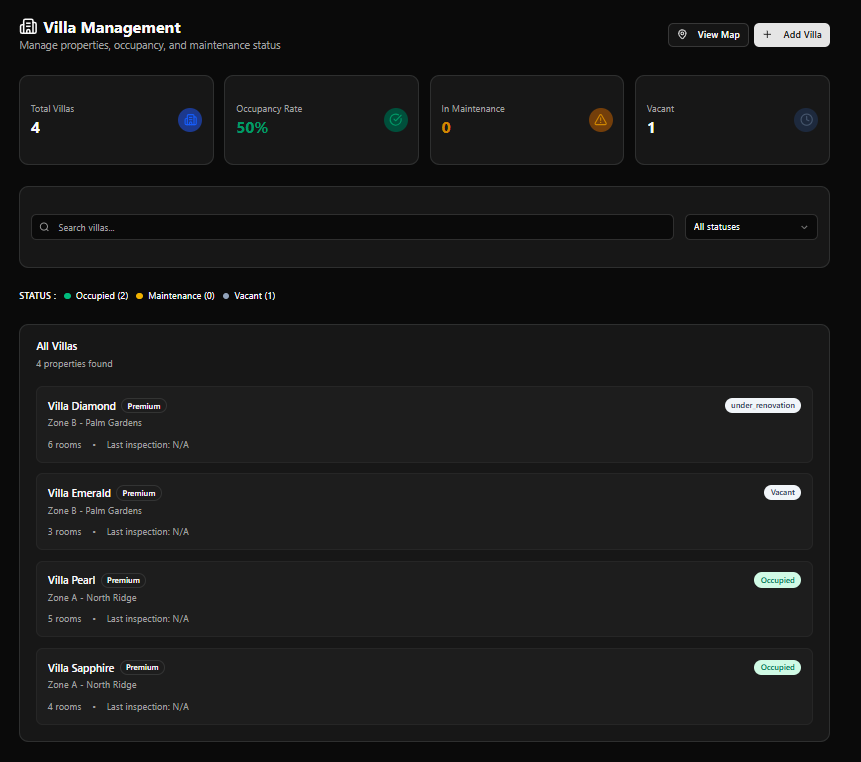
The Villa Management module is the property registry for M2. It stores all villa records, tracks occupancy and maintenance status, surfaces owner and manager contacts, and links directly to work order creation.
Page Header
Section titled “Page Header”| Element | Description |
|---|---|
| Title | Villa Management |
| Subtitle | Manage properties, occupancy, and maintenance status |
| View Map | Opens the Villa Map View (CARTO/OpenStreetMap) |
| + Add Villa | Opens the Register New Villa form |
KPI Cards
Section titled “KPI Cards”| Card | Color | Description |
|---|---|---|
| Total Villas | Blue | Total registered properties |
| Occupancy Rate | Green | % of villas currently occupied |
| In Maintenance | Amber | Villas with active maintenance status |
| Vacant | Gray | Villas currently unoccupied |
Example values (live data): Total Villas: 4 · Occupancy Rate: 50% · In Maintenance: 0 · Vacant: 1
Search & Filter
Section titled “Search & Filter”| Control | Description |
|---|---|
| Search villas… | Full-text search by villa name or zone |
| All statuses | Dropdown filter: Occupied / Maintenance / Vacant |
Status Legend
Section titled “Status Legend”Below the search bar, a STATUS : row shows live counts with colour indicators:
| Indicator | Status | Colour |
|---|---|---|
| ● | Occupied | Green |
| ● | Maintenance | Amber |
| ● | Vacant | Gray/Blue |
Villa List
Section titled “Villa List”The All Villas panel shows every registered property. Each row displays:
| Element | Description |
|---|---|
| Villa Name | Property name |
| Premium badge | Tier badge (if applicable) |
| Status badge | e.g. Occupied, Vacant, under renovation |
| Zone | e.g. Zone B - Palm Gardens, Zone A - North Ridge |
| Rooms | Number of registered rooms |
| Last inspection | Date of last inspection, or N/A |
Current Villas (Example Data)
Section titled “Current Villas (Example Data)”| Villa | Zone | Rooms | Status |
|---|---|---|---|
| Villa Diamond | Zone B - Palm Gardens | 6 | Under Renovation |
| Villa Emerald | Zone B - Palm Gardens | 3 | Vacant |
| Villa Pearl | Zone A - North Ridge | 5 | Occupied |
| Villa Sapphire | Zone A - North Ridge | 4 | Occupied |
Villa Map View
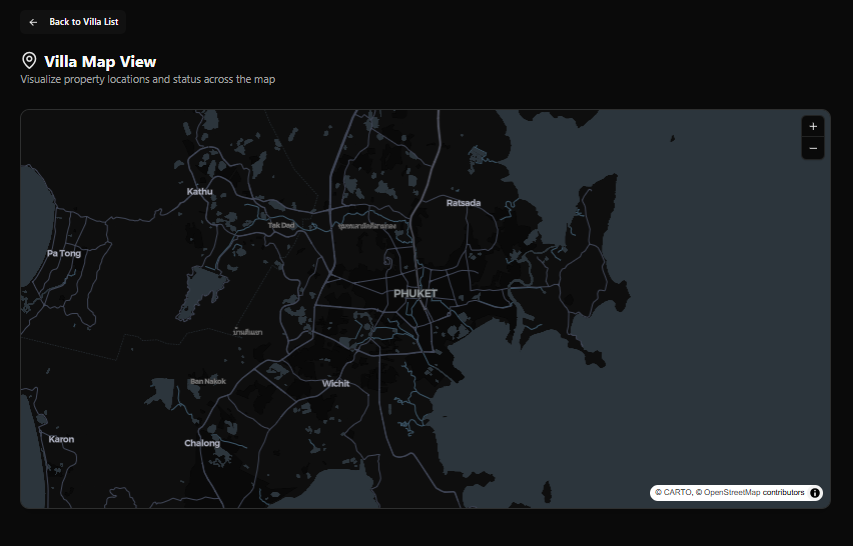
Section titled “Villa Map View”Access via the View Map button.
| Element | Description |
|---|---|
| Title | Villa Map View |
| Subtitle | Visualize property locations and status across the map |
| Map | CARTO dark tiles over OpenStreetMap — centred on Phuket |
| Zoom controls | + / – buttons (top right) |
| Attribution | © CARTO, © OpenStreetMap contributors |
| Back link | ← Back to Villa List |
Villa markers on the map reflect the status colour scheme used throughout M2:
| Colour | Status |
|---|---|
| Green | Operational / Occupied |
| Orange | In Maintenance |
| Red | Emergency |
Register New Villa Form
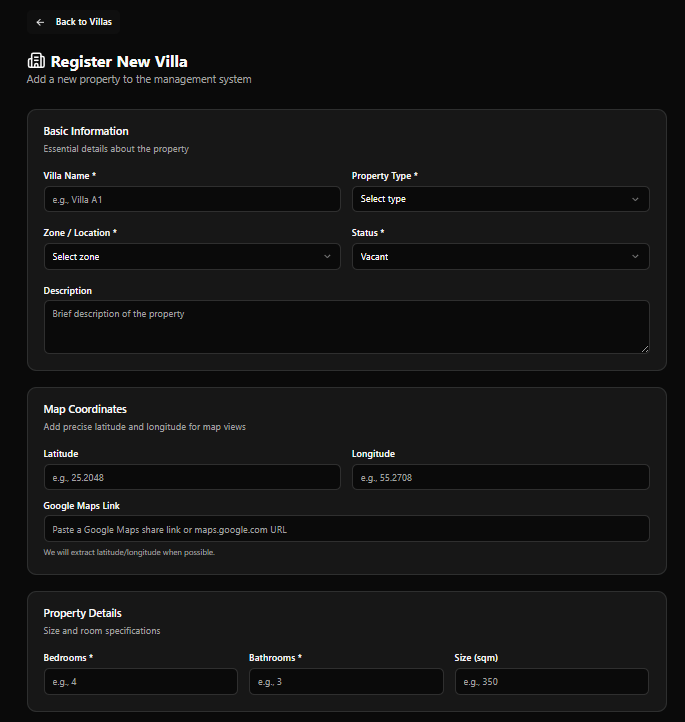
Section titled “Register New Villa Form”Access via + Add Villa. Back link: ← Back to Villas
Title: Register New Villa Subtitle: Add a new property to the management system
Basic Information
Section titled “Basic Information”Essential details about the property
| Field | Required | Notes |
|---|---|---|
| Villa Name | Yes | e.g. Villa A1 |
| Property Type | Yes | Dropdown — Select type |
| Zone / Location | Yes | Dropdown — Select zone |
| Status | Yes | Default: Vacant |
| Description | No | Brief description of the property |
Map Coordinates
Section titled “Map Coordinates”Add precise latitude and longitude for map views
| Field | Notes |
|---|---|
| Latitude | e.g. 25.2048 |
| Longitude | e.g. 55.2708 |
| Google Maps Link | Paste a Google Maps share link or maps.google.com URL — latitude/longitude extracted automatically when possible |
Property Details
Section titled “Property Details”Size and room specifications
| Field | Required | Notes |
|---|---|---|
| Bedrooms | Yes | e.g. 4 |
| Bathrooms | Yes | e.g. 3 |
| Size (sqm) | No | e.g. 350 |
Address
Section titled “Address”Physical address of the property
| Field | Notes |
|---|---|
| Full Address | Enter the complete property address |
Owner Information
Section titled “Owner Information”Contact details of the property owner
| Field | Notes |
|---|---|
| Owner Name | Full name |
| Phone Number | e.g. +66 xxx xxx xxxx |
| Email Address | e.g. [email protected] |
Manager Information
Section titled “Manager Information”Contact details of the property manager
| Field | Notes |
|---|---|
| Manager Name | Full name |
| Phone Number | e.g. +66 xxx xxx xxxx |
| Email Address | e.g. [email protected] |
Form Actions
Section titled “Form Actions”| Button | Action |
|---|---|
| Cancel | Discard and return to Villa Management |
| Register Villa | Save and add the villa to the system |
Villa Detail Page
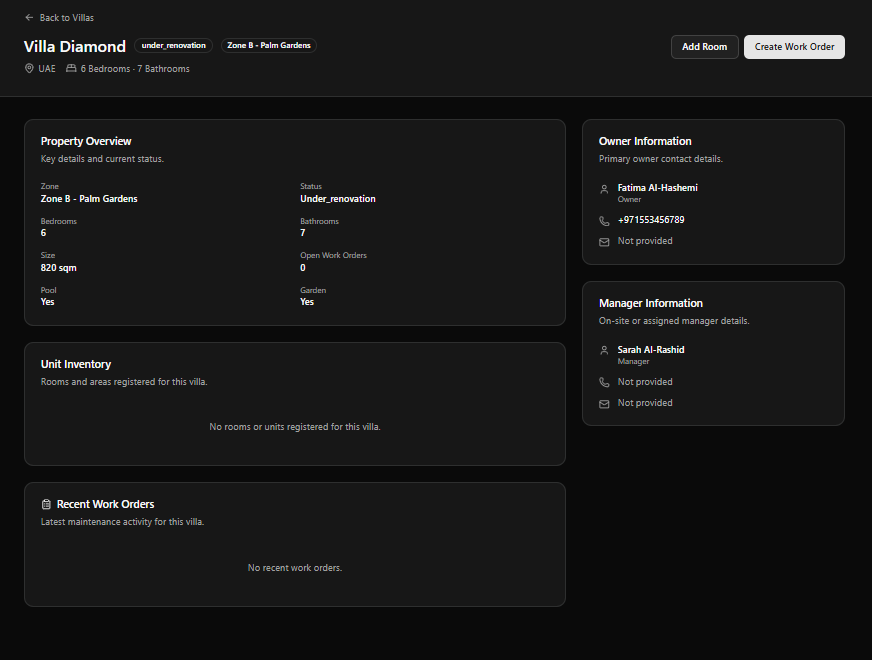
Section titled “Villa Detail Page”Click any villa row to open its full detail page.
Page Header
Section titled “Page Header”| Element | Description |
|---|---|
| Villa Name | e.g. Villa Diamond |
| Status badge | e.g. under_renovation |
| Zone badge | e.g. Zone B - Palm Gardens |
| Location | Country flag icon + location label (e.g. 🇦🇪 UAE) |
| Bedrooms / Bathrooms | Quick summary (e.g. 6 Bedrooms · 7 Bathrooms) |
| Add Room | Register a new room or area for this villa |
| Create Work Order | Create a work order linked directly to this villa |
| Back link | ← Back to Villas |
Property Overview
Section titled “Property Overview”Key details and current status
| Field | Example |
|---|---|
| Zone | Zone B - Palm Gardens |
| Status | Under_renovation |
| Bedrooms | 6 |
| Bathrooms | 7 |
| Size | 820 sqm |
| Open Work Orders | 0 |
| Pool | Yes |
| Garden | Yes |
Unit Inventory
Section titled “Unit Inventory”Lists all rooms and areas registered for this villa. When empty:
No rooms or units registered for this villa.
Use the Add Room button in the page header to register rooms.
Recent Work Orders
Section titled “Recent Work Orders”Latest maintenance activity for this villa
Shows the most recent work orders linked to this property. When empty:
No recent work orders.
Owner Information (Sidebar)
Section titled “Owner Information (Sidebar)”| Field | Example |
|---|---|
| Name & Role | Fatima Al-Hashemi — Owner |
| Phone | +971553456789 |
| Not provided |
Manager Information (Sidebar)
Section titled “Manager Information (Sidebar)”| Field | Example |
|---|---|
| Name & Role | Sarah Al-Rashid — Manager |
| Phone | Not provided |
| Not provided |
Fields display
Not providedwhen contact details were not entered during villa registration.
Registering a Villa
Section titled “Registering a Villa”flowchart TD A[Click + Add Villa] --> B[Fill Basic Information\nName · Type · Zone · Status] B --> C[Add Map Coordinates\nor paste Google Maps link] C --> D[Fill Property Details\nBedrooms · Bathrooms · Size] D --> E[Enter Full Address] E --> F[Add Owner Information] F --> G[Add Manager Information] G --> H[Click Register Villa] H --> I[Villa added to system\nAppears in Villa List and Map View]